# Welcome
iDos Games Engine is LiveOps, AI, mobile tools and backed solution for your cross-platform games and apps. All in One solution that improves user Retention and increases revenue per user (LTV).
Our iDos Games Engine has a detailed meta-game and each module is tightly connected to each other, which is good for long-term retention and LTV. But it's up to you to decide which modules to enable and which to disable.
**START FOR FREE:** [**iDos Games Engine**](https://platform.idosgames.com/)
**Github:** [**Unity SDK**](https://github.com/iDos-Games/iDos-Games-Engine-Unity-SDK)
🖥️ Platform support:\
✅ Windows\
✅ Linux\
✅ Mac OS M1\
✅ Mac OS Intel\
✅ Android\
✅ iOS\
✅ WebGL\
✅ Game Consoles
**Key features (works out of the box):**
* **Telegram Mini Apps.** Integration with Telegram Mini Apps, which allows you to integrate referral system, payment system with Telegram and Rewarded Video Ads (earning from ads). You can also host your WebGL build on the server for free.
* **Analytics.**\
Integrate analytics from Firebase and AppMetrica (free) into your game and track your game's key metrics.
* **Mobile Advertising Mediation.**\
Show ads from more than 20 ad networks and earn more, as the ads will be shown to the highest bidder in the auction. App Tracking Transparency(ATT Compliance), GDPR.
* **Profile System.**\
Easily manage player accounts. You can reward, ban, monitor player progress, etc.
* **Friend System.**\
In addition to the standard friend system, we have introduced a 3d avatar system. All players now have 3D avatars and can be dressed in different clothes and things.
* **3D Avatar System.**\
All players now have avatars in 3d and they can be dressed in different clothes and things. These items can also be traded on the Item Marketplace. 3D avatar included in the package
* **Marketplace.**\
Trade with other players for items and clothing for 3d avatars.
* **Inventory System.**
* **VIP Subscription System.**\
Reward VIP users with increased rewards and disabling ads. Also give VIP rewards in Events. Also validation and verification of subscriptions is carried out on the server, which prevents fraud on the part of players. You can also reward users with Eternal VIP.
* **Validation of In-App Purchase and VIP Subscription.**\
Validation and verification of in-game purchases and VIP subscriptions is done through the server, which prevents player fraud.
* **Tournaments.**\
Hold weekly tournaments among players and reward the top 10-1000 players with valuable rewards.
* **Events related to VIP Subscription System.**\
Our Events have combined the power of VIP subscriptions and Battle Pass. With this system, your LTVs will increase.
* **Spin System.**\
Spin the wheel of fortune to get keys to open chests. To spin the wheel of fortune you need to get or buy a Spin Ticket.
* **Lootbox System.**\
Open chests of different rarities and get items or clothing for avatars.
* **Shop System.**\
Manage your Store remotely from the server and all players will have everything updated online.\
Special Offers. Show players special offerings limited by time or quantity to increase conversion to purchase.\
Daily Offers. Show players daily offers that are updated every 24 hours.\
Daily Free Rewards. Give players daily rewards that update every 24 hours.
* **Referral System.**\
Allows players to invite friends to the game by link, QR or by entering PlayerID, and receive rewards for inviting 1, 3, 5, 7, 10 friends. Also the player who invited a friend receives 5% (percentage can be changed) of each player's spending in Shop and Marketplace in virtual currency for life. The player who activated PlayerID, or installed by QR or link receives a reward for the first activation.
* **Mobile Push Notification.**\
Set up Push notifications to be shown in certain cases, even if there is no internet.
* **Authorization.**\
Auto login by DeviceID works by default, but the player can register by email and set a password.
* **Currency**\
The solution has Soft and Hard Currency, which is good for balancing the game. You can also add your own currency if you need it.
* **Game Items**\
Items such as 3D avatar clothing are already pre-installed. Items have their own rarity. You can create your own items and set your own logic for items.
* **Message System**\
Shows system messages and messages from the server. You can add your own messages if needed.
* **Application Update System.**\
If necessary, shows the player a popup with a link to an update that can be skipped or made mandatory.
* **Reward System.**\
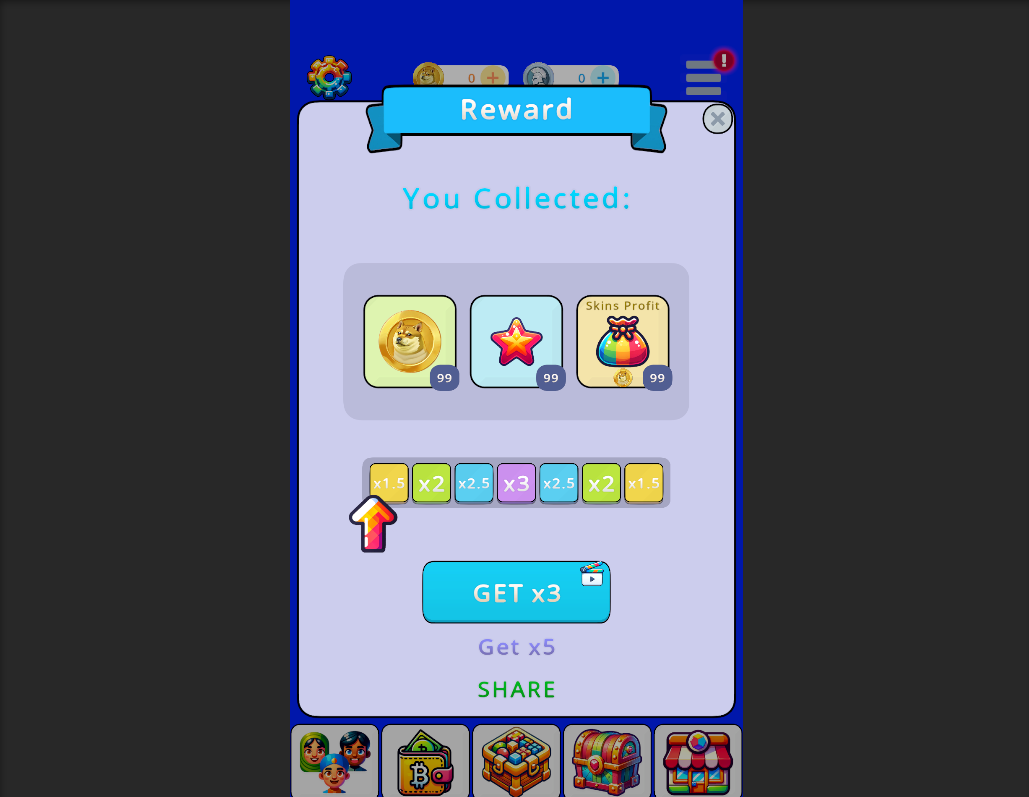
A complete solution that shows the player a popup with a reward that can be increased by viewing ads or by VIP subscription.
* **3D item inspection System.**\
A system that allows you to inspect skins and 3D items, 3D avatars, items in the Marketplace.
* **Crypto Wallet.**\
Virtual Currency can be made cryptocurrency if you enable Crypto Wallet. Allow players to own in-game assets such as currency and items. You can tie in-game currency to your own token and items to NFT and allow players to withdraw/enter currency and items from/to the game. You can create different games linked by a single currency and items, where players can transfer currency and items from one game to another game. Create your linked ecosystem of games and apps, keeping players in your ecosystem for the long term.
* **Web NFT Marketplace.**\
For the convenience of developers and players, items from the game can be withdrawn to a wallet and traded on the site on the NFT Marketplace. It is convenient, for example, when you have several games with the same items, players from different games can trade on one common marketplace.\
Inventory Items have their own rarity and can be converted to NFT if you enable Crypto Wallet.
## Start right now
# Quick Start Unity SDK
{% embed url="" %}
1. In **Unity Hub**, create a new project (use the latest version of **Unity LTS**) or open your existing project.
2. After opening the project go to “**File**” -> “**Build Profiles**”. Select “**Web**” and click on the “**Switch Platform**” button
3. After changing the platform go to the “**Player Settings**” section
4. And in the “**Other Settings**” subsection, set the settings like this:
5. And in the “**Publishing Settings**” subsection, set the settings like this:
6. Next, we need to install **iDos Games SDK** into the project. To do this we need to download the latest version of the package from the link -
7. Then go to the menu “**iDos Games**” -> “**General Settings**” and in Inspector set the test **TitleID** = **8HC7K5TB** and press the button “**Save Settings**”
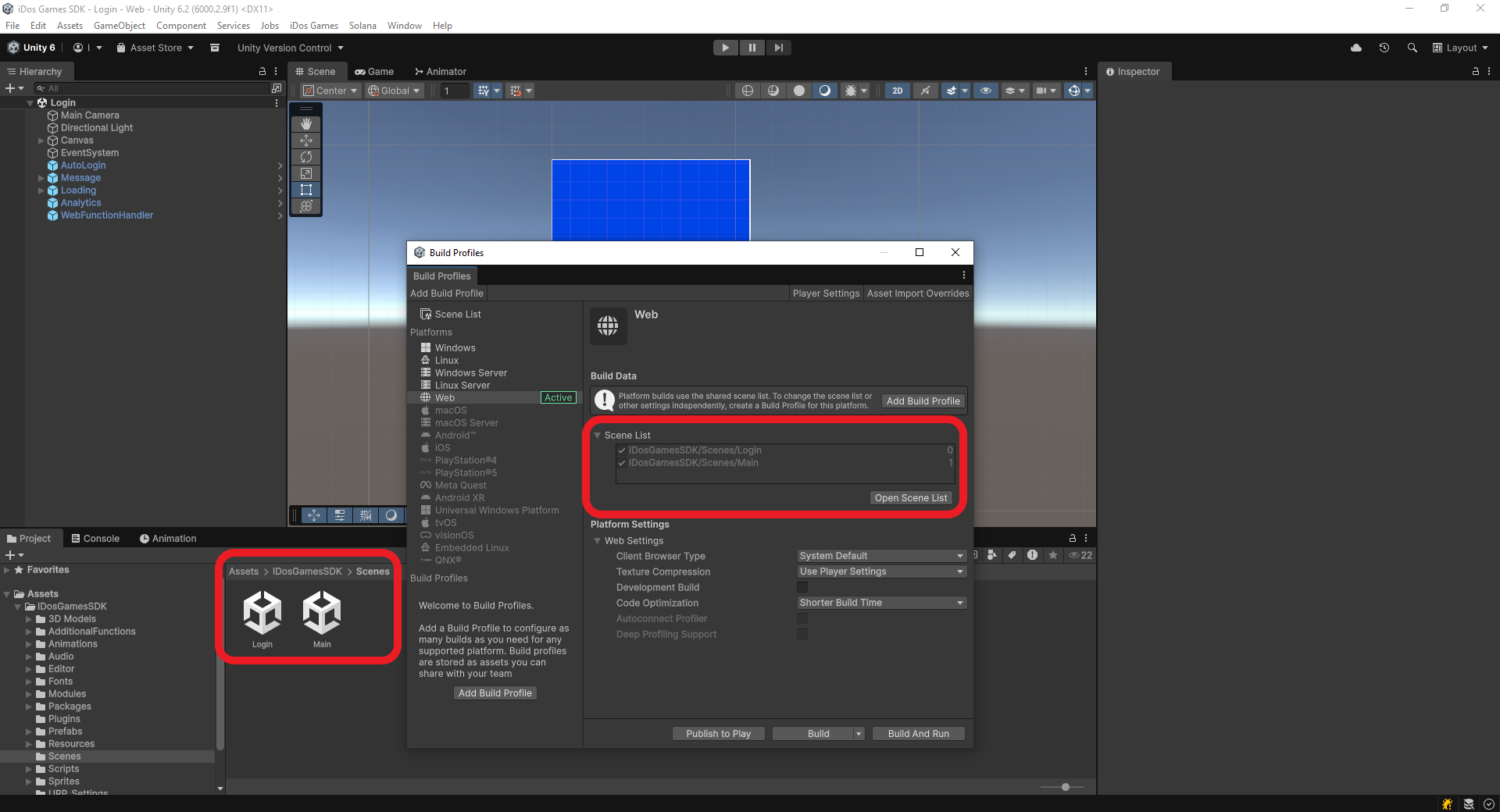
8. After customizing **iDos Games SDK**, let's test the solution. To do this, let's add demo scenes to the project. And then run the “**Login**” scene.
9. If you are using **Unity 2021 or 2022**, make sure that in the **Assets\iDosGamesSDK Modules\Crypto Wallet IGC\Nethereum** folder all libraries except **NethereumMetamask.jslib** have such settings as in the picture below
{% hint style="success" %}
Congratulations! You've created your first cross-platform app!
Further in the documentation, check out how you can integrate your app into other platforms such as iDos Games Platform, Google Play, Apple AppStore, Telegram Mini Apps and others, create your own token smart-contracts and NFT contracts and integrate in a couple of clicks into your app, integrate AI, set up ad monetization, subscriptions and more.
{% endhint %}
# Frequently Used Functions
1. After successfully installing iDos Games SDK, copy the **Login** and **Main** scenes to your project folder and set the **Login scene first** and **Main scene second**.
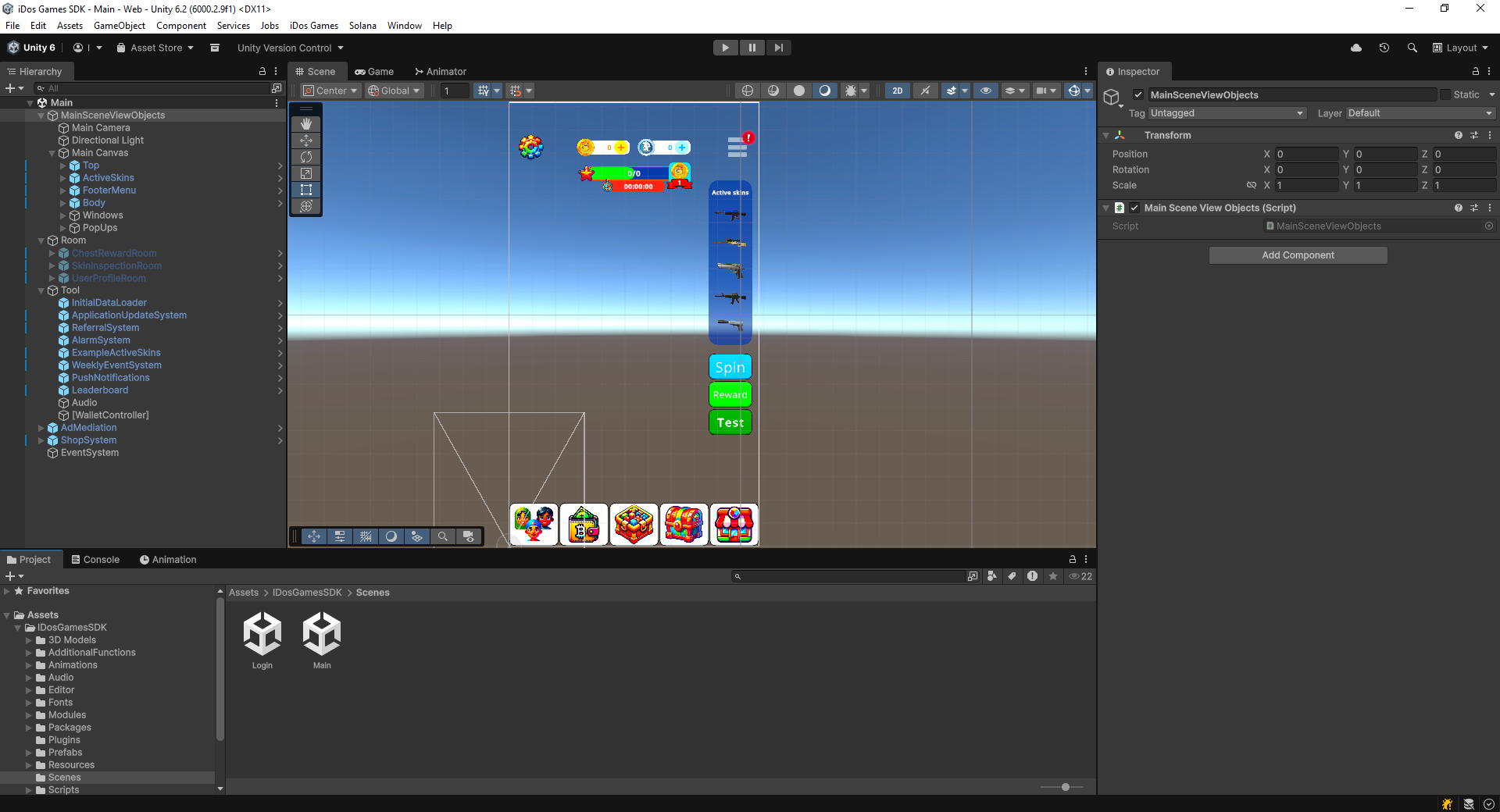
2. The **Login** and **Main scenes** already contain all the scripts and components to ensure everything works out of the box. The **Login scene** is where the player registers or logs in, and then transitions to the **Main scene**.
3. You can simply hide unnecessary functionality from the SDK from the **UI in the Main Canvas**.
## Rewards
Any good game needs to **reward players** for specific actions or rewards. The SDK includes ready-made functionality for implementing rewards, you can view them by clicking the **"Reward" button**.
## **ClaimRewardSystem**
If you are writing your own reward implementation, you can use the **ClaimRewardSystem** class in your code.
#### ClaimCoinReward
```
// Player reward in Coins (soft currency) and event points
int coinReward = 1000;
int eventPoint = 1;
ClaimRewardSystem.ClaimCoinReward(coinReward, eventPoint)
```
#### ClaimTokenReward (VIP)
```
// Player reward in Tokens (hard currency) and event points. Players who have VIP status can call.
int tokenReward = 100;
int eventPoint = 1;
ClaimRewardSystem.ClaimTokenReward(tokenReward, eventPoint)
```
#### ClaimSkinProfit (VIP)
```
// Player receive rewards in tokens if they wear skins that generate income in tokens. VIP only
ClaimRewardSystem.ClaimSkinProfit()
```
## UserInventory
In this class, you can get data about the user's inventory. How many items, currency, spins, and chests the user has.
```
// Get the number of items by itemID (string)
int itemAmount = UserInventory.GetItemAmount(itemID);
// Get the amount of currency by VirtualCurrencyID
int currencyAmount = UserInventory.GetVirtualCurrencyAmount(VirtualCurrencyID.CO);
// Get the number of tickets by SpinTicketType
int ticketAmount = UserInventory.GetSpinTicketAmount(SpinTicketType.Standard);
// Get the number of key fragments based on ChestKeyFragmentType. To open the chest, you need to collect all 3 key fragments.
int commonKey1 = UserInventory.GetChestKeyFragmentAmount(ChestKeyFragmentType.Common_1);
// Get a bool value indicating whether the user is a VIP.
bool isVip = UserInventory.HasVIPStatus
// etc.
```
## UserDataService and IGSUserData
All player data is retrieved and processed in these classes. You can **retrieve data** such as **inventory**, **currencies**, and **other player data**.
```
// Returns the player's inventory
IGSUserData.UserInventory
// Returns player currencies
IGSUserData.Currency
// etc.
```
#### Saving Player Data
If you need to implement saving of custom player data, then use the following methods.
```
// Saving data by key
UserDataService.UpdateCustomUserData("Key1", "Key Value");
// Getting data by key
string value = UserDataService.GetCachedCustomUserData("Key1");
```
# Telegram Mini Apps
How to create a Web3 Game from scratch and add it to Telegram Mini Apps
{% embed url="" %}
Before we add our Web3 game to **Telegram Mini Apps** you can [create a Web3 game in 1 minute](/start/quick-start-unity-sdk).
1. You need to go to [BotFather](https://t.me/botfather) to create a bot and app in Telegram.
2. **Create New Bot**
To start you need to press the Start button or send:
```
/start
```
To create a new bot you need to send:
```
/newbot
```
Give your bot a name and send it to chat:
```
MyTgGame
```
Now we need to give username to the bot so it ends in “bot” and send:
```
MyTgGame_bot
```
Your bot has been created. Now you can move on to creating the app.
3. **Create New App**
To create a new web app you need to send:
```
/newapp
```
The app binds to a specific bot, you need to send its name with an **@** sign:
```
@MyTgGame_bot
```
Next, enter the name of the web application:
```
My Tg Game
```
After that, you need to enter a short description:
```
My Tg Game description
```
Next, you need to **send a picture** of your app with a strict resolution of **640×360 pixels.**
After that you need to upload the **GIF** or send it:
```
/empty
```
Now we need to paste the link to the game we got here, you need to copy the link belonging to the yellow **“Play Now Web Application”** button, which is in **Dashboard**
Now please choose a short name for your web app: 3-30 characters, a-zA-Z0-9\_. This short name will be used in URLs like **t.me/MyTgGame\_bot/myapp** and serve as a unique identifier for your web app.
```
myapp
```
{% hint style="success" %}
Now you have your own game in Telegram!
{% endhint %}
3. **Server settings**
Now we need to get a Bot Token:
```
/mybots
```
Select your bot by clicking on the bot name and click **API Token.**
The obtained **API token** should be inserted into your [**Title Settings**](https://platform.idosgames.com/settings/integrations). To do this, go to **Settings** -> **Integrations** in the **menu**.
In the **Telegram** section there is a field **“Telegram Bot Token”**, there you need to insert your **API token** obtained from **@BotFather** and click **“Save Settings”** button.
After successfully saving the settings, click on the **“Register Telegram Webhook”** button.
And in **“Platform Settings”** under **“Telegram Mini Apps”**, change the **“Referral App Link”** field to the link of your Telegram game. This is necessary for the **referral link** to work correctly in your Telegram Mini App.
{% hint style="success" %}
Congratulations! You now have a game in Telegram Mini Apps! Now you can set up advertising and start earning from your game!
{% endhint %}
# API v1
# Authentication
This endpoint is used to authenticate users and perform various actions such as device login, email login, and registration.
URL**:** `https://api.idosgames.com/api/[titleTemplateId]/[titleId]/Client/Authentication/`
## LoginWithDeviceID
**Purpose:** Allows a user to log in using their device ID.\
\
**URL:**
{% code overflow="wrap" %}
```
https://api.idosgames.com/api/[titleTemplateId]/[titleId]/Client/Authentication/LoginWithDeviceID
```
{% endcode %}
**Method:** `POST`
**Request Parameters (JSON body)**
* `deviceID` (string): The unique identifier of the user's device.
* `platform` (string): The platform the device is running on (e.g., Android, iOS).
* `device` (string): Information about the device (e.g., model or type).
* `ip` (string, optional): The user's IP address.
* `userName` (string, optional): The user's username.
**Responses**
* **200 OK**: Successful login. Returns a `GetAllUserDataResult` object with user data.
* **400 Bad Request**: Incorrect request parameters. Returns an error message, e.g., "INVALID\_INPUT\_DATA".
**Example Usage**
**Request:**
{% tabs %}
{% tab title="JavaScript" %}
{% code overflow="wrap" lineNumbers="true" %}
```javascript
fetch('https://api.idosgames.com/api/[titleTemplateId]/[titleId]/Client/Authentication/LoginWithDeviceID', {
method: 'POST',
headers: {
'Content-Type': 'application/json'
},
body: JSON.stringify({
DeviceID: 'unique-device-id',
Platform: 'Android',
Device: 'Samsung Galaxy S21',
UserName: 'exampleUser'
})
})
.then(response => response.json())
.then(data => console.log(data))
.catch(error => console.error('Error:', error));
```
{% endcode %}
{% endtab %}
{% endtabs %}
**Response:**
{% code lineNumbers="true" %}
```json
{
"UserID": "generated-user-id",
"CustomUserData": {
"DataVersion": 1,
"Data": {}
},
...
}
```
{% endcode %}
***
## LoginWithEmail
**Purpose:** Allows a user to log in using their email and password.\
\
**URL:**
{% code overflow="wrap" %}
```
https://api.idosgames.com/api/[titleTemplateId]/[titleId]/Client/Authentication/LoginWithEmail
```
{% endcode %}
**Method:** `POST`
**Request Parameters (JSON body)**
* `email` (string): The user's email address.
* `password` (string): The user's password.
**Responses**
* **200 OK**: Successful login. Returns a `GetAllUserDataResult` object with user data.
* **400 Bad Request**: Incorrect request parameters or invalid credentials. Possible messages: "INVALID\_INPUT\_DATA", "USER\_NOT\_FOUND", "INCORRECT\_PASSWORD".
**Example Usage**
**Request:**
{% tabs %}
{% tab title="JavaScript" %}
{% code overflow="wrap" lineNumbers="true" %}
```javascript
fetch('https://api.idosgames.com/api/[titleTemplateId]/[titleId]/Client/Authentication/LoginWithEmail', {
method: 'POST',
headers: {
'Content-Type': 'application/json'
},
body: JSON.stringify({
email: 'user@example.com',
password: 'securepassword'
})
})
.then(response => response.json())
.then(data => console.log(data))
.catch(error => console.error('Error:', error));
```
{% endcode %}
{% endtab %}
{% endtabs %}
**Response:**
{% code overflow="wrap" lineNumbers="true" %}
```json
{
"UserID": "existing-user-id",
"CustomUserData": {
"DataVersion": 1,
"Data": {}
},
...
}
```
{% endcode %}
***
## AddEmailAndPassword
**Purpose:** Adds an email and password to an existing user's account.\
\
**URL:**
{% code overflow="wrap" %}
```
https://api.idosgames.com/api/[titleTemplateId]/[titleId]/Client/Authentication/AddEmailAndPassword
```
{% endcode %}
**Method:** `POST`
**Request Parameters (JSON body)**
* `userID` (string): The user's unique identifier.
* `email` (string): The email address to be added.
* `password` (string): The password to be added.
* `clientSessionTicket` (string): The session ticket for authenticating the current session.
**Responses**
* **200 OK**: Operation successful. Returns a success message.
* **400 Bad Request**: Incorrect request parameters or validation error. Possible messages: "INVALID\_INPUT\_DATA", "USER\_NOT\_FOUND", "SESSION\_EXPIRED", "INVALID\_SESSION\_TICKET", "EMAIL\_ALREADY\_EXISTS", "FAILED\_TO\_SAVE\_TO\_DATABASE".
**Example Usage**
**Request:**
{% tabs %}
{% tab title="JavaScript" %}
{% code overflow="wrap" lineNumbers="true" %}
```javascript
fetch('https://api.idosgames.com/api/[titleTemplateId]/[titleId]/Client/Authentication/AddEmailAndPassword', {
method: 'POST',
headers: {
'Content-Type': 'application/json'
},
body: JSON.stringify({
userID: 'existing-user-id',
email: 'newemail@example.com',
password: 'newpassword',
clientSessionTicket: 'valid-session-ticket'
})
})
.then(response => response.json())
.then(data => console.log(data))
.catch(error => console.error('Error:', error));
```
{% endcode %}
{% endtab %}
{% endtabs %}
**Response:**
{% code overflow="wrap" lineNumbers="true" %}
```json
{
"Message": "SUCCESS"
}
```
{% endcode %}
***
## RegisterUserByEmail
**Purpose:** Registers a new user using their email and password.
**URL:**
{% code overflow="wrap" %}
```
https://api.idosgames.com/api/[titleTemplateId]/[titleId]/Client/Authentication/RegisterUserByEmail
```
{% endcode %}
**Method:** `POST`
**Request Parameters (JSON body)**
* `email` (string): The email address for registration.
* `password` (string): The password for the new account.
* `platform` (string): The user's platform.
* `device` (string): The user's device information.
* `deviceID` (string): The user's device ID.
* `ip` (string, optional): The user's IP address.
* `userName` (string, optional): The user's username.
**Responses**
* **200 OK**: Successful registration. Returns a `GetAllUserDataResult` object with new user data.
* **400 Bad Request**: Incorrect request parameters or email already in use. Possible messages: "INVALID\_INPUT\_DATA", "EMAIL\_ALREADY\_EXISTS", "REGISTRATION\_FAILED".
**Example Usage**
**Request:**
{% tabs %}
{% tab title="JavaScript" %}
{% code overflow="wrap" lineNumbers="true" %}
```javascript
fetch('https://api.idosgames.com/api/[titleTemplateId]/[titleId]/Client/Authentication/RegisterUserByEmail', {
method: 'POST',
headers: {
'Content-Type': 'application/json'
},
body: JSON.stringify({
email: 'newuser@example.com',
password: 'securepassword',
platform: 'iOS',
device: 'iPhone 13',
deviceID: 'unique-device-id'
})
})
.then(response => response.json())
.then(data => console.log(data))
.catch(error => console.error('Error:', error));
```
{% endcode %}
{% endtab %}
{% endtabs %}
**Response:**
{% code overflow="wrap" lineNumbers="true" %}
```json
{
"UserID": "new-generated-user-id",
"CustomUserData": {
"DataVersion": 1,
"Data": {}
},
...
}
```
{% endcode %}
# User Data
## GetUserAllData
#### Purpose
Retrieves all user data based on the provided user ID.
#### URL
```plaintext
https://api.idosgames.com/api/[titleTemplateId]/[titleId]/Client/UserData/GetUserAllData
```
#### Method
* `GET` or `POST`
#### Request Parameters (JSON body)
* `userID` (string): The unique identifier of the user.
#### Responses
* **200 OK**: Successful retrieval. Returns a `GetAllUserDataResult` object with user data.
* **400 Bad Request**: If there is an error in retrieving the data.
#### Example Usage
**Request**:
```javascript
fetch('https://api.idosgames.com/api/[titleTemplateId]/[titleId]/Client/UserData/GetUserAllData', {
method: 'POST',
headers: {
'Content-Type': 'application/json'
},
body: JSON.stringify({
userID: 'existing-user-id'
})
})
.then(response => response.json())
.then(data => console.log(data))
.catch(error => console.error('Error:', error));
```
**Response**:
```json
{
"UserID": "existing-user-id",
"CustomUserData": {
"DataVersion": 1,
"Data": {}
},
...
}
```
## GetUserInventory
#### Purpose
Retrieves the inventory of a user.
#### URL
```plaintext
https://api.idosgames.com/api/[titleTemplateId]/[titleId]/Client/UserData/GetUserInventory
```
#### Method
* `GET` or `POST`
#### Request Parameters (JSON body)
* `userID` (string): The unique identifier of the user.
#### Responses
* **200 OK**: Successful retrieval. Returns a `GetUserInventoryResult` object with inventory data.
* **400 Bad Request**: If there is an error in retrieving the inventory.
#### Example Usage
**Request**:
```javascript
fetch('https://api.idosgames.com/api/[titleTemplateId]/[titleId]/Client/UserData/GetUserInventory', {
method: 'POST',
headers: {
'Content-Type': 'application/json'
},
body: JSON.stringify({
userID: 'existing-user-id'
})
})
.then(response => response.json())
.then(data => console.log(data))
.catch(error => console.error('Error:', error));
```
**Response**:
```json
{
"Inventory": [
{
"ItemID": "item-1",
"Quantity": 5
},
...
]
}
```
## UpdateCustomUserData
#### Purpose
Updates custom user data with the provided key-value pair.
#### URL
```plaintext
https://api.idosgames.com/api/[titleTemplateId]/[titleId]/Client/UserData/UpdateCustomUserData
```
#### Method
* `POST`
#### Request Parameters (JSON body)
* `key` (string): Key of the custom user data to update.
* `value` (string): New value for the custom user data.
#### Responses
* **200 OK**: Successful update. Returns a success message.
* **400 Bad Request**: If there is an error in the update request.
#### Example Usage
**Request**:
```javascript
fetch('https://api.idosgames.com/api/[titleTemplateId]/[titleId]/Client/UserData/UpdateCustomUserData', {
method: 'POST',
headers: {
'Content-Type': 'application/json'
},
body: JSON.stringify({
key: 'customKey',
value: 'customValue'
})
})
.then(response => response.json())
.then(data => console.log(data))
.catch(error => console.error('Error:', error));
```
**Response**:
```json
{
"Message": "SUCCESS"
}
```
## DeleteTitlePlayerAccount
#### Purpose
Deletes the account of a player in a specific title.
#### URL
```plaintext
https://api.idosgames.com/api/[titleTemplateId]/[titleId]/Client/UserData/DeleteTitlePlayerAccount
```
#### Method
* `POST`
#### Request Parameters (JSON body)
* `userID` (string): The unique identifier of the user.
#### Responses
* **200 OK**: Successful deletion. Returns a success message.
* **400 Bad Request**: If there is an error in the deletion request.
#### Example Usage
**Request**:
```javascript
fetch('https://api.idosgames.com/api/[titleTemplateId]/[titleId]/Client/UserData/DeleteTitlePlayerAccount', {
method: 'POST',
headers: {
'Content-Type': 'application/json'
},
body: JSON.stringify({
userID: 'existing-user-id'
})
})
.then(response => response.json())
.then(data => console.log(data))
.catch(error => console.error('Error:', error));
```
**Response**:
```json
{
"Message": "SUCCESS"
}
```
## UpdateLeaderBoard
#### Purpose
Updates the leaderboard score for a user.
#### URL
```plaintext
https://api.idosgames.com/api/[titleTemplateId]/[titleId]/Client/UserData/UpdateLeaderBoard
```
#### Method
* `POST`
#### Request Parameters (JSON body)
* `userID` (string): The unique identifier of the user.
* `amount` (int, optional): The amount to update the leaderboard score by. Default is 1.
#### Responses
* **200 OK**: Successful update. Returns a success message.
* **400 Bad Request**: If there is an error in the update request.
#### Example Usage
**Request**:
```javascript
fetch('https://api.idosgames.com/api/[titleTemplateId]/[titleId]/Client/UserData/UpdateLeaderBoard', {
method: 'POST',
headers: {
'Content-Type': 'application/json'
},
body: JSON.stringify({
userID: 'existing-user-id',
amount: 5
})
})
.then(response => response.json())
.then(data => console.log(data))
.catch(error => console.error('Error:', error));
```
**Response**:
```json
{
"Message": "SUCCESS"
}
```
## GetCatalogItems
#### Purpose
Retrieves the catalog items for a specific catalog version.
#### URL
```plaintext
https://api.idosgames.com/api/[titleTemplateId]/[titleId]/Client/UserData/GetCatalogItems
```
#### Method
* `GET` or `POST`
#### Request Parameters (JSON body)
* `catalogVersion` (string): The version of the catalog to retrieve items from.
#### Responses
* **200 OK**: Successful retrieval. Returns a list of catalog items.
* **400 Bad Request**: If there is an error in retrieving the catalog items.
#### Example Usage
**Request**:
```javascript
fetch('https://api.idosgames.com/api/[titleTemplateId]/[titleId]/Client/UserData/GetCatalogItems', {
method: 'POST',
headers: {
'Content-Type': 'application/json'
},
body: JSON.stringify({
catalogVersion: 'v1'
})
})
.then(response => response.json())
.then(data => console.log(data))
.catch(error => console.error('Error:', error));
```
**Response**:
```json
{
"CatalogItems": [
{
"ItemID": "item-1",
"Name": "Sword",
"Price": 100
},
...
]
}
```
## GetLeaderboard
#### Purpose
Retrieves the leaderboard data for a specific leaderboard ID.
#### URL
```plaintext
https://api.idosgames.com/api/[titleTemplateId]/[titleId]/Client/UserData/GetLeaderboard
```
#### Method
* `GET` or `POST`
#### Request Parameters (JSON body)
* `leaderboardID` (string): The ID of the leaderboard to retrieve data from.
#### Responses
* **200 OK**: Successful retrieval. Returns leaderboard data.
* **400 Bad Request**: If there is an error in retrieving the leaderboard data.
#### Example Usage
**Request**:
```javascript
fetch('https://api.idosgames.com/api/[titleTemplateId]/[titleId]/Client/UserData/GetLeaderboard', {
method: 'POST',
headers: {
'Content-Type': 'application/json'
},
body: JSON.stringify({
leaderboardID: 'leaderboard-1'
})
})
.then(response => response.json())
.then(data => console.log(data))
.catch(error => console.error('Error:', error));
```
**Response**:
```json
{
"Leaderboard": [
{
"UserID": "user-1",
"Score": 1500
},
...
]
}
```
## GetServerTime
#### Purpose
Retrieves the current server time.
#### URL
```plaintext
https://api.idosgames.com/api/[titleTemplateId]/[titleId]/Client/UserData/GetServerTime
```
#### Method
* `GET`
#### Responses
* **200 OK**: Successful retrieval. Returns the current server time.
#### Example Usage
**Request**:
```javascript
fetch('https://api.idosgames.com/api/[titleTemplateId]/[titleId]/Client/UserData/GetServerTime', {
method: 'GET',
headers: {
'Content-Type': 'application/json'
}
})
.then(response => response.json())
.then(data => console.log(data))
.catch(error => console.error('Error:', error));
```
**Response**:
```json
{
"ServerTime": "2023-04-01T12:00:00Z"
}
```
# Crypto Wallet
This endpoint is used to perform various blockchain transactions, such as token and NFT transactions, to and from the game and users' crypto wallets.
#### URL
```
https://api.idosgames.com/api/{titleTemplateId}/{titleId}/Client/CryptoWallet/Transaction
```
#### Method
* POST
#### Route Parameters
* `titleTemplateId` (string): The template ID of the title.
* `titleId` (string): The ID of the title.
#### Request Body (JSON)
```json
{
"WebAppLink": "string",
"UsageTime": "int",
"ClientSessionTicket": "string",
"EntityToken": "string",
"UserID": "string",
"TransactionType": "string",
"TransactionDirection": "string",
"ChainID": "string",
"TransactionHash": "string",
"VirtualCurrencyID": "string",
"Amount": "string",
"WalletAddress": "string",
"SkinID": "string"
}
```
#### Responses
* `200 OK`: Successful operation. Returns the transaction status.
* `400 Bad Request`: Incorrect request parameters or validation error. Possible messages:
* `INVALID_REQUEST_ARGS`
* `TITLEID_INCORRECT`
* `INCORRECT_CHAIN_ID`
* `INCORRECT_TRANSACTION_TYPE`
* `INCORRECT_TRANSACTION_DIRECTION`
## **MakeTokenTransactionToGame**
**Description**: This action handles the transfer of tokens to the game from the user's wallet.
* **Route**: `/Transaction`
* **Method**: POST
**Request Parameters**:
```json
{
"WebAppLink": "string",
"UsageTime": "int",
"ClientSessionTicket": "string",
"EntityToken": "string",
"UserID": "string",
"TransactionType": "Token",
"TransactionDirection": "Game",
"ChainID": "string",
"TransactionHash": "string"
}
```
**Responses**
* `200 OK`: Transaction successful. Returns a success message with the transaction hash.
* `400 Bad Request`: Incorrect request parameters. Possible errors include `INVALID_REQUEST_ARGS`, `INCORRECT_HASH`, `INCORRECT_TRANSACTION`, `TRANSACTION_HASH_ALREADY_USED`, `INCORRECT_TOKEN_ID`, and `FAILED_TO_SAVE_TO_DATABASE`.
**Example Usage**:
```javascript
fetch('https://api.idosgames.com/api/{titleTemplateId}/{titleId}/Client/CryptoWallet/Transaction', {
method: 'POST',
headers: {
'Content-Type': 'application/json'
},
body: JSON.stringify({
WebAppLink: 'https://example.com/?titleID=0',
UsageTime: 120,
ClientSessionTicket: 'valid-session-ticket',
EntityToken: 'valid-entity-token',
UserID: 'user-id',
TransactionType: 'Token',
TransactionDirection: 'Game',
ChainID: '1',
TransactionHash: 'hash-value'
})
})
.then(response => response.json())
.then(data => console.log(data))
.catch(error => console.error('Error:', error));
```
***
## **MakeTokenTransactionToUsersCryptoWallet**
**Description**: This action handles the transfer of tokens to the user's wallet from the game.
* **Route**: `/Transaction`
* **Method**: POST
**Request Parameters**:
```json
{
"WebAppLink": "string",
"UsageTime": "int",
"ClientSessionTicket": "string",
"EntityToken": "string",
"UserID": "string",
"TransactionType": "Token",
"TransactionDirection": "UsersCryptoWallet",
"ChainID": "string",
"VirtualCurrencyID": "string",
"Amount": "string",
"WalletAddress": "string"
}
```
**Responses**
* `200 OK`: Transaction successful. Returns a success message with the transaction hash.
* `400 Bad Request`: Incorrect request parameters. Possible errors include `INVALID_REQUEST_ARGS`, `INCORRECT_VIRTUAL_CURRENCY_ID`, `INCORRECT_AMOUNT`, `INCORRECT_WALLET_ADDRESS`, `FAILED_TO_MODIFY_VIRTUAL_CURRENCY`, `NOT_ENOUGH_FUNDS`, `ALL_RESOURCES_ARE_BUSY`, and `FAILED_TO_SAVE_TO_DATABASE`.
**Example Usage**:
```javascript
fetch('https://api.idosgames.com/api/{titleTemplateId}/{titleId}/Client/CryptoWallet/Transaction', {
method: 'POST',
headers: {
'Content-Type': 'application/json'
},
body: JSON.stringify({
WebAppLink: 'https://example.com/?titleID=0',
UsageTime: 120,
ClientSessionTicket: 'valid-session-ticket',
EntityToken: 'valid-entity-token',
UserID: 'user-id',
TransactionType: 'Token',
TransactionDirection: 'UsersCryptoWallet',
ChainID: '1',
VirtualCurrencyID: 'VCID',
Amount: '100',
WalletAddress: 'wallet-address'
})
})
.then(response => response.json())
.then(data => console.log(data))
.catch(error => console.error('Error:', error));
```
***
## **MakeNFTTransactionToGame**
**Description**: This action handles the transfer of NFTs to the game from the user's wallet.
* **Route**: `/Transaction`
* **Method**: POST
**Request Parameters**:
```json
{
"WebAppLink": "string",
"UsageTime": "int",
"ClientSessionTicket": "string",
"EntityToken": "string",
"UserID": "string",
"TransactionType": "NFT",
"TransactionDirection": "Game",
"ChainID": "string",
"TransactionHash": "string"
}
```
**Responses**
* `200 OK`: Transaction successful. Returns a success message with the transaction hash.
* `400 Bad Request`: Incorrect request parameters. Possible errors include `INVALID_REQUEST_ARGS`, `INCORRECT_HASH`, `INCORRECT_TRANSACTION`, `TRANSACTION_HASH_ALREADY_USED`, `INCORRECT_NFT_ID`, `FAILED_TO_SAVE_TO_DATABASE`, and `FAILED_TO_GRANT_ITEMS`.
**Example Usage**:
```javascript
fetch('https://api.idosgames.com/api/{titleTemplateId}/{titleId}/Client/CryptoWallet/Transaction', {
method: 'POST',
headers: {
'Content-Type': 'application/json'
},
body: JSON.stringify({
WebAppLink: 'https://example.com/?titleID=0',
UsageTime: 120,
ClientSessionTicket: 'valid-session-ticket',
EntityToken: 'valid-entity-token',
UserID: 'user-id',
TransactionType: 'NFT',
TransactionDirection: 'Game',
ChainID: '1',
TransactionHash: 'hash-value'
})
})
.then(response => response.json())
.then(data => console.log(data))
.catch(error => console.error('Error:', error));
```
***
## **MakeNFTTransactionToUsersCryptoWallet**
**Description**: This action handles the transfer of NFTs to the user's wallet from the game.
* **Route**: `/Transaction`
* **Method**: POST
**Request Parameters**:
```json
{
"WebAppLink": "string",
"UsageTime": "int",
"ClientSessionTicket": "string",
"EntityToken": "string",
"UserID": "string",
"TransactionType": "NFT",
"TransactionDirection": "UsersCryptoWallet",
"ChainID": "string",
"SkinID": "string",
"Amount": "string",
"WalletAddress": "string"
}
```
**Responses**
* `200 OK`: Transaction successful. Returns a success message with the transaction hash.
* `400 Bad Request`: Incorrect request parameters. Possible errors include `INVALID_REQUEST_ARGS`, `INCORRECT_SKIN_ID`, `INCORRECT_AMOUNT`, `INCORRECT_WALLET_ADDRESS`, `FAILED_TO_CONSUME_ITEMS`, `FAILED_TO_MODIFY_VIRTUAL_CURRENCY`, `NOT_ENOUGH_FUNDS`, `ALL_RESOURCES_ARE_BUSY`, and `FAILED_TO_SAVE_TO_DATABASE`.
**Example Usage**:
```javascript
fetch('https://api.idosgames.com/api/{titleTemplateId}/{titleId}/Client/CryptoWallet/Transaction', {
method: 'POST',
headers: {
'Content-Type': 'application/json'
},
body: JSON.stringify({
WebAppLink: 'https://example.com/?titleID=0',
UsageTime: 120,
ClientSessionTicket: 'valid-session-ticket',
EntityToken: 'valid-entity-token',
UserID: 'user-id',
TransactionType: 'NFT',
TransactionDirection: 'UsersCryptoWallet',
ChainID: '1',
SkinID: 'skin-id',
Amount: '1',
WalletAddress: 'wallet-address'
})
})
.then(response => response.json())
.then(data => console.log(data))
.catch(error => console.error('Error:', error));
```
***
# Referral
This function is used to manage referral actions. It can handle activation of referral codes and validate sessions.
**URL:**
`https://api.idosgames.com/api/[titleTemplateId]/[titleId]/Client/Referral/[action]`
**Method:**
`GET` or `POST`
**Request Parameters:**
* `titleId` (string): Title ID of the application.
* `titleTemplateId` (string): Template ID of the title.
* `action` (string): The specific referral action to perform.
* `HttpRequest req`: HTTP request object containing the body with the following JSON structure:
```json
{
"WebAppLink": "string",
"UsageTime": "int",
"FunctionParameter": {
"ReferralCode": "string"
},
"UserID": "string",
"ClientSessionTicket": "string",
"EntityToken": "string"
}
```
## ActivateReferralCode
Activates a referral code provided by another user.
**URL:**
`https://api.idosgames.com/api/[titleTemplateId]/[titleId]/Client/Referral/ActivateReferralCode`
**Method:**
`POST`
**Request Parameters (JSON body):**
* `FunctionParameters`:
* `ReferralCode` (string): The referral code to be activated.
**Responses:**
* **200 OK**: Referral code successfully activated. Returns a success message:
* `REFERRAL_MESSAGE_CODE_SUCCESS_ACTIVATED`
* **400 Bad Request**: Incorrect referral code, or activation issues. Possible messages:
* `args or refferalCode is null`
* `INCORRECT_TITLE_ID_OR_STATUS_INACTIVE`
* `REFERRAL_MESSAGE_CODE_YOUR`
* `REFERRAL_MESSAGE_CODE_INCORRECT`
* `REFERRAL_MESSAGE_CODE_ALREADY_ACTIVATED`
#### Example Usage:
**Request:**
```javascript
fetch('https://api.idosgames.com/api/[titleTemplateId]/[titleId]/Client/Referral/ActivateReferralCode', {
method: 'POST',
headers: {
'Content-Type': 'application/json'
},
body: JSON.stringify({
"FunctionParameter": {
"ReferralCode": "ABC123"
}
})
})
.then(response => response.json())
.then(data => console.log(data))
.catch(error => console.error('Error:', error));
```
**Response:**
```json
{
"Message": "REFERRAL_MESSAGE_CODE_SUCCESS_ACTIVATED"
}
```
# Chest
## GetCommonChestReward
**URL**
```javascript
https://api.idosgames.com/api/{titleTemplateId}/{titleId}/Client/Chest/GetCommonChestReward
```
**Description**
This action retrieves the reward from a common chest.
**HTTP Method**
* POST
**Request Body (JSON)**
```javascript
{
"WebAppLink": "string",
"UsageTime": "int",
"ClientSessionTicket": "string",
"EntityToken": "string",
"UserID": "string"
}
```
**Response Codes**
* `200 OK`: Returns the ID of the reward item granted.
* `400 Bad Request`: Possible error messages:
* `INVALID_REQUEST_ARGS`
* `INVALID_ACTION`
* `INCORRECT_TITLE_ID_OR_STATUS_INACTIVE`
* `INCORRECT_ACTION`
* `INCORRECT_USER_ID`
**Example Usage**
```javascript
fetch('https://api.idosgames.com/api/{titleTemplateId}/{titleId}/Client/Chest/GetCommonChestReward', {
method: 'POST',
headers: {
'Content-Type': 'application/json'
},
body: JSON.stringify({
WebAppLink: 'https://example.com/?titleID=0',
UsageTime: 120,
ClientSessionTicket: 'valid-session-ticket',
EntityToken: 'valid-entity-token',
UserID: 'user-id'
})
})
.then(response => response.json())
.then(data => console.log(data))
.catch(error => console.error('Error:', error));
```
###
## GetRareChestReward
**URL**
```javascript
https://api.idosgames.com/api/{titleTemplateId}/{titleId}/Client/Chest/GetRareChestReward
```
**Description**
This action retrieves the reward from a rare chest.
**HTTP Method**
* POST
**Request Body (JSON)**
```javascript
{
"WebAppLink": "string",
"UsageTime": "int",
"ClientSessionTicket": "string",
"EntityToken": "string",
"UserID": "string"
}
```
**Response Codes**
* `200 OK`: Returns the ID of the reward item granted.
* `400 Bad Request`: Possible error messages:
* `INVALID_REQUEST_ARGS`
* `INVALID_ACTION`
* `INCORRECT_TITLE_ID_OR_STATUS_INACTIVE`
* `INCORRECT_ACTION`
* `INCORRECT_USER_ID`
**Example Usage**
```javascript
fetch('https://api.idosgames.com/api/{titleTemplateId}/{titleId}/Client/Chest/GetRareChestReward', {
method: 'POST',
headers: {
'Content-Type': 'application/json'
},
body: JSON.stringify({
WebAppLink: 'https://example.com/?titleID=0',
UsageTime: 120,
ClientSessionTicket: 'valid-session-ticket',
EntityToken: 'valid-entity-token',
UserID: 'user-id'
})
})
.then(response => response.json())
.then(data => console.log(data))
.catch(error => console.error('Error:', error));
```
###
## GetLegendaryChestReward
**URL**
```javascript
https://api.idosgames.com/api/{titleTemplateId}/{titleId}/Client/Chest/GetLegendaryChestReward
```
**Description**
This action retrieves the reward from a legendary chest.
**HTTP Method**
* POST
**Request Body (JSON)**
```javascript
{
"WebAppLink": "string",
"UsageTime": "int",
"ClientSessionTicket": "string",
"EntityToken": "string",
"UserID": "string"
}
```
**Response Codes**
* `200 OK`: Returns the ID of the reward item granted.
* `400 Bad Request`: Possible error messages:
* `INVALID_REQUEST_ARGS`
* `INVALID_ACTION`
* `INCORRECT_TITLE_ID_OR_STATUS_INACTIVE`
* `INCORRECT_ACTION`
* `INCORRECT_USER_ID`
**Example Usage**
```javascript
fetch('https://api.idosgames.com/api/{titleTemplateId}/{titleId}/Client/Chest/GetLegendaryChestReward', {
method: 'POST',
headers: {
'Content-Type': 'application/json'
},
body: JSON.stringify({
WebAppLink: 'https://example.com/?titleID=0',
UsageTime: 120,
ClientSessionTicket: 'valid-session-ticket',
EntityToken: 'valid-entity-token',
UserID: 'user-id'
})
})
.then(response => response.json())
.then(data => console.log(data))
.catch(error => console.error('Error:', error));
```
###
# Friend
This documentation explains the different endpoints and functionalities of the Friend API that is part of the IDosGamesSDK. This API handles various actions related to friend management.
**Base URL**
```
https://api.idosgames.com/api/[titleTemplateId]/[titleId]/Client/Friend/
```
**Overview**
The Friend API provides several endpoints to manage friends within the game. Each endpoint requires a specific HTTP method and may require certain parameters to be passed in the request body.
**Endpoints**
## Get My Friends
**Purpose:** Returns a list of the user's friends.
**URL:**
```
GET https://api.idosgames.com/api/[titleTemplateId]/[titleId]/Client/Friend/GetMyFriends
```
**Method:** GET
**Response Codes:**
* `200 OK`: Successful retrieval. Returns a list of friends.
* `400 Bad Request`: Invalid `userID`.
**Example Usage:**
```javascript
fetch('https://api.idosgames.com/api/[titleTemplateId]/[titleId]/Client/Friend/GetMyFriends', {
method: 'GET',
headers: {
'Content-Type': 'application/json'
}
})
.then(response => response.json())
.then(data => console.log(data))
.catch(error => console.error('Error:', error));
```
## Add Friend Request
**Purpose:** Sends a friend request to another user.
**URL:**
```
POST https://api.idosgames.com/api/[titleTemplateId]/[titleId]/Client/Friend/AdditionRequest
```
**Method:** POST
**Request Parameters (JSON body):**
* `FriendID` (string): The `userID` of the potential friend.
**Response Codes:**
* `200 OK`: Friend request sent successfully.
* `400 Bad Request`: Invalid request parameters.
**Example Usage:**
```javascript
fetch('https://api.idosgames.com/api/[titleTemplateId]/[titleId]/Client/Friend/AdditionRequest', {
method: 'POST',
headers: {
'Content-Type': 'application/json'
},
body: JSON.stringify({
FriendID: 'user-id-of-friend'
})
})
.then(response => response.json())
.then(data => console.log(data))
.catch(error => console.error('Error:', error));
```
## Get Recommended Friends
**Purpose:** Retrieves a list of recommended friends based on similar attributes.
**URL:**
```
GET https://api.idosgames.com/api/[titleTemplateId]/[titleId]/Client/Friend/GetRecommendedFriends
```
**Method:** GET
**Response Codes:**
* `200 OK`: Successful retrieval. Returns a list of recommended friends.
* `400 Bad Request`: Invalid `userID`.
**Example Usage:**
```javascript
fetch('https://api.idosgames.com/api/[titleTemplateId]/[titleId]/Client/Friend/GetRecommendedFriends', {
method: 'GET',
headers: {
'Content-Type': 'application/json'
}
})
.then(response => response.json())
.then(data => console.log(data))
.catch(error => console.error('Error:', error));
```
## Accept Friend Request
**Purpose:** Accepts a pending friend request from another user.
**URL:**
```
POST https://api.idosgames.com/api/[titleTemplateId]/[titleId]/Client/Friend/AcceptRequest
```
**Method:** POST
**Request Parameters (JSON body):**
* `FriendID` (string): The `userID` of the friend whose request is being accepted.
**Response Codes:**
* `200 OK`: Friend request accepted successfully.
* `400 Bad Request`: Invalid request parameters.
**Example Usage:**
```javascript
fetch('https://api.idosgames.com/api/[titleTemplateId]/[titleId]/Client/Friend/AcceptRequest', {
method: 'POST',
headers: {
'Content-Type': 'application/json'
},
body: JSON.stringify({
FriendID: 'user-id-of-friend'
})
})
.then(response => response.json())
.then(data => console.log(data))
.catch(error => console.error('Error:', error));
```
## Reject Friend Request
**Purpose:** Rejects a pending friend request from another user.
**URL:**
```
POST https://api.idosgames.com/api/[titleTemplateId]/[titleId]/Client/Friend/RejectRequest
```
**Method:** POST
**Request Parameters (JSON body):**
* `FriendID` (string): The `userID` of the friend whose request is being rejected.
**Response Codes:**
* `200 OK`: Friend request rejected successfully.
* `400 Bad Request`: Invalid request parameters.
**Example Usage:**
```javascript
fetch('https://api.idosgames.com/api/[titleTemplateId]/[titleId]/Client/Friend/RejectRequest', {
method: 'POST',
headers: {
'Content-Type': 'application/json'
},
body: JSON.stringify({
FriendID: 'user-id-of-friend'
})
})
.then(response => response.json())
.then(data => console.log(data))
.catch(error => console.error('Error:', error));
```
## Remove Friend
**Purpose:** Removes an existing friend from the user's friend list.
**URL:**
```
POST https://api.idosgames.com/api/[titleTemplateId]/[titleId]/Client/Friend/RemoveFriend
```
**Method:** POST
**Request Parameters (JSON body):**
* `FriendID` (string): The `userID` of the friend to be removed.
**Response Codes:**
* `200 OK`: Friend removed successfully.
* `400 Bad Request`: Invalid request parameters.
**Example Usage:**
```javascript
fetch('https://api.idosgames.com/api/[titleTemplateId]/[titleId]/Client/Friend/RemoveFriend', {
method: 'POST',
headers: {
'Content-Type': 'application/json'
},
body: JSON.stringify({
FriendID: 'user-id-of-friend'
})
})
.then(response => response.json())
.then(data => console.log(data))
.catch(error => console.error('Error:', error));
```
## Update User Power
**Purpose:** Updates the user's power level.
**URL:**
```
POST https://api.idosgames.com/api/[titleTemplateId]/[titleId]/Client/Friend/UpdateUserPower
```
**Method:** POST
**Request Parameters (JSON body):**
* `Power` (int): The new power level to be set.
**Response Codes:**
* `200 OK`: Power level updated successfully.
* `400 Bad Request`: Invalid request parameters.
**Example Usage:**
```javascript
fetch('https://api.idosgames.com/api/[titleTemplateId]/[titleId]/Client/Friend/UpdateUserPower', {
method: 'POST',
headers: {
'Content-Type': 'application/json'
},
body: JSON.stringify({
Power: 5000
})
})
.then(response => response.json())
.then(data => console.log(data))
.catch(error => console.error('Error:', error));
```
## Get Pending Friend Requests
**Purpose:** Retrieves a list of all pending friend requests.
**URL:**
```
GET https://api.idosgames.com/api/[titleTemplateId]/[titleId]/Client/Friend/GetPendingFriendRequests
```
**Method:** GET
**Response Codes:**
* `200 OK`: Successful retrieval. Returns a list of pending friend requests.
* `400 Bad Request`: Invalid `userID`.
**Example Usage:**
```javascript
fetch('https://api.idosgames.com/api/[titleTemplateId]/[titleId]/Client/Friend/GetPendingFriendRequests', {
method: 'GET',
headers: {
'Content-Type': 'application/json'
}
})
.then(response => response.json())
.then(data => console.log(data))
.catch(error => console.error('Error:', error));
```
## Get Submitted Requests
**Purpose:** Retrieves a list of friend requests sent by the user.
**URL:**
```
GET https://api.idosgames.com/api/[titleTemplateId]/[titleId]/Client/Friend/GetSubmittedRequests
```
**Method:** GET
**Response Codes:**
* `200 OK`: Successful retrieval. Returns a list of submitted friend requests.
* `400 Bad Request`: Invalid `userID`.
**Example Usage:**
```javascript
fetch('https://api.idosgames.com/api/[titleTemplateId]/[titleId]/Client/Friend/GetSubmittedRequests', {
method: 'GET',
headers: {
'Content-Type': 'application/json'
}
})
.then(response => response.json())
.then(data => console.log(data))
.catch(error => console.error('Error:', error));
```
## Find User
**Purpose:** Finds and retrieves information about a user.
**URL:**
```
POST https://api.idosgames.com/api/[titleTemplateId]/[titleId]/Client/Friend/FindUser
```
**Method:** POST
**Request Parameters (JSON body):**
* `FriendID` (string): The `userID` of the user to be found.
**Response Codes:**
* `200 OK`: User found successfully. Returns user details.
* `400 Bad Request`: Invalid request parameters or user not found.
**Example Usage:**
```javascript
fetch('https://api.idosgames.com/api/[titleTemplateId]/[titleId]/Client/Friend/FindUser', {
method: 'POST',
headers: {
'Content-Type': 'application/json'
},
body: JSON.stringify({
FriendID: 'user-id-to-find'
})
})
.then(response => response.json())
.then(data => console.log(data))
.catch(error => console.error('Error:', error));
```
## Get Random User
**Purpose:** Retrieves a random user that matches certain criteria for potential friendship.
**URL:**
```
GET https://api.idosgames.com/api/[titleTemplateId]/[titleId]/Client/Friend/GetRandomUser
```
**Method:** GET
**Response Codes:**
* `200 OK`: Successful retrieval. Returns a random user.
* `400 Bad Request`: No matching users found.
**Example Usage:**
```javascript
fetch('https://api.idosgames.com/api/[titleTemplateId]/[titleId]/Client/Friend/GetRandomUser', {
method: 'GET',
headers: {
'Content-Type': 'application/json'
}
})
.then(response => response.json())
.then(data => console.log(data))
.catch(error => console.error('Error:', error));
```
# Marketplace
This documentation covers the various endpoints and actions available for the Marketplace API. The API allows for operations such as creating, updating, deleting, and buying offers on the marketplace, as well as handling user sessions and royalty calculations.
**Base URL**
```
https://api.idosgames.com/api/[titleTemplateId]/[titleId]/Client/Marketplace/
```
## CreateOffer
**Purpose:** To create a new offer on the marketplace.
**URL:**
```
https://api.idosgames.com/api/[titleTemplateId]/[titleId]/Client/Marketplace/CreateOffer
```
**Method:** POST
**Request Parameters (JSON body):**
* `ItemID` (string): The ID of the item.
* `VirtualCurrencyID` (string): The ID of the virtual currency.
* `Price` (string): The price of the item.
**Responses:**
* `200 OK`: Operation successful. Returns a success message.
* `400 Bad Request`: Incorrect request parameters. Possible messages: "INVALID\_INPUT\_DATA", "ITEM\_NOT\_EXISTS\_IN\_INVENTORY", "INCORRECT\_VIRTUAL\_CURRENCY\_ID", "FAILED\_TO\_SAVE\_TO\_DATABASE", etc.
**Example Usage:**
**Request:**
```javascript
fetch('https://api.idosgames.com/api/[titleTemplateId]/[titleId]/Client/Marketplace/CreateOffer', {
method: 'POST',
headers: {
'Content-Type': 'application/json'
},
body: JSON.stringify({
ItemID: 'item-id-example',
VirtualCurrencyID: 'currency-id-example',
Price: '100'
})
})
.then(response => response.json())
.then(data => console.log(data))
.catch(error => console.error('Error:', error));
```
**Response:**
```json
{
"Message": "SUCCESS"
}
```
## DeleteOffer
**Purpose:** To delete an offer from the marketplace.
**URL:**
```
https://api.idosgames.com/api/[titleTemplateId]/[titleId]/Client/Marketplace/DeleteOffer
```
**Method:** POST
**Request Parameters (JSON body):**
* `ID` (string): The ID of the offer to delete.
**Responses:**
* `200 OK`: Operation successful. Returns a success message.
* `400 Bad Request`: Incorrect request parameters. Possible messages: "INVALID\_INPUT\_DATA", "ITEM\_NOT\_EXISTS\_IN\_DB", "ITEM\_OWNED\_BY\_ANOTHER\_USER", "FAILED\_TO\_UPDATE\_ITEM\_IN\_DB", etc.
**Example Usage:**
**Request:**
```javascript
fetch('https://api.idosgames.com/api/[titleTemplateId]/[titleId]/Client/Marketplace/DeleteOffer', {
method: 'POST',
headers: {
'Content-Type': 'application/json'
},
body: JSON.stringify({
ID: 'offer-id-example'
})
})
.then(response => response.json())
.then(data => console.log(data))
.catch(error => console.error('Error:', error));
```
**Response:**
```json
{
"Message": "SUCCESS"
}
```
## UpdateOffer
**Purpose:** To update an existing offer on the marketplace.
**URL:**
```
https://api.idosgames.com/api/[titleTemplateId]/[titleId]/Client/Marketplace/UpdateOffer
```
**Method:** POST
**Request Parameters (JSON body):**
* `ID` (string): The ID of the offer to update.
* `VirtualCurrencyID` (string): The new virtual currency ID.
* `Price` (string): The new price for the item.
**Responses:**
* `200 OK`: Operation successful. Returns a success message.
* `400 Bad Request`: Incorrect request parameters. Possible messages: "INVALID\_INPUT\_DATA", "ITEM\_NOT\_EXISTS\_IN\_DB", "ITEM\_OWNED\_BY\_ANOTHER\_USER", "NOTHING\_TO\_UPDATE", "FAILED\_TO\_UPDATE\_ITEM\_IN\_DB", etc.
**Example Usage:**
**Request:**
```javascript
fetch('https://api.idosgames.com/api/[titleTemplateId]/[titleId]/Client/Marketplace/UpdateOffer', {
method: 'POST',
headers: {
'Content-Type': 'application/json'
},
body: JSON.stringify({
ID: 'offer-id-example',
VirtualCurrencyID: 'new-currency-id',
Price: '150'
})
})
.then(response => response.json())
.then(data => console.log(data))
.catch(error => console.error('Error:', error));
```
**Response:**
```json
{
"Message": "SUCCESS"
}
```
## BuyOffer
**Purpose:** To buy an offer on the marketplace.
**URL:**
```
https://api.idosgames.com/api/[titleTemplateId]/[titleId]/Client/Marketplace/BuyOffer
```
**Method:** POST
**Request Parameters (JSON body):**
* `ID` (string): The ID of the offer to buy.
**Responses:**
* `200 OK`: Successful operation. Returns a success message.
* `400 Bad Request`: Incorrect request parameters or error in the buying process. Possible messages: "INVALID\_INPUT\_DATA", "ITEM\_NOT\_EXISTS\_IN\_DB", "CANT\_BUY\_YOUR\_ITEM", "NOT\_ENOUGH\_FUNDS", "FAILED\_TO\_MODIFY\_VIRTUAL\_CURRENCY", "FAILED\_TO\_GRANT\_ITEMS", "FAILED\_TO\_UPDATE\_ITEM\_IN\_DB", etc.
**Example Usage:**
**Request:**
```javascript
fetch('https://api.idosgames.com/api/[titleTemplateId]/[titleId]/Client/Marketplace/BuyOffer', {
method: 'POST',
headers: {
'Content-Type': 'application/json'
},
body: JSON.stringify({
ID: 'offer-id-example'
})
})
.then(response => response.json())
.then(data => console.log(data))
.catch(error => console.error('Error:', error));
```
**Response:**
```json
{
"Message": "SUCCESS"
}
```
***
## **GetGroupedActiveOffers**
Retrieves grouped active offers for the specified title.
**Action**: `GroupedOffers`
**Purpose**: Retrieves grouped active offers based on ItemID.
**Example Usage**
Request:
```javascript
fetch('https://api.example.com/api/1234/5678/Client/MarketplaceData/GroupedOffers', {
method: 'POST',
headers: {
'Content-Type': 'application/json'
},
body: JSON.stringify({
WebAppLink: 'https://example.com',
UserID: 'example-user-id',
ClientSessionTicket: 'valid-session-ticket',
EntityToken: 'example-token',
UsageTime: 120
})
})
.then(response => response.json())
.then(data => console.log(data))
.catch(error => console.error('Error:', error));
```
Response:
```json
{
"Items": [
{"ItemID": "item1", "OfferCount": 5},
{"ItemID": "item2", "OfferCount": 3}
]
}
```
## **GetActiveOffersByItemID**
Retrieves active offers for a specific item ID.
**Action**: `ActiveOffersByItemID`
**Purpose**: Retrieves active offers based on ItemID, with optional filtering and sorting.
**Example Usage**
Request:
```javascript
fetch('https://api.example.com/api/1234/5678/Client/MarketplaceData/ActiveOffersByItemID', {
method: 'POST',
headers: {
'Content-Type': 'application/json'
},
body: JSON.stringify({
ItemID: 'example-item-id',
VirtualCurrencyID: 'USD',
PriceFrom: '1.00',
PriceTo: '10.00',
SortOrder: 'Ascending',
OrderBy: 'Price',
MaxItemCount: 10
})
})
.then(response => response.json())
.then(data => console.log(data))
.catch(error => console.error('Error:', error));
```
Response:
```json
{
"Items": [
{"ID": "offer1", "ItemID": "example-item-id", "SellerID": "seller1", "CurrencyID": "USD", "Price": 5.00},
{"ID": "offer2", "ItemID": "example-item-id", "SellerID": "seller2", "CurrencyID": "USD", "Price": 8.00}
],
"ContinuationToken": "next-token-id"
}
```
## **GetPlayerHistory**
Retrieves player transaction history.
**Action**: `PlayerHistory`
**Purpose**: Retrieves the transaction history for a player based on their UserID.
**Example Usage**
Request:
```javascript
fetch('https://api.example.com/api/1234/5678/Client/MarketplaceData/PlayerHistory', {
method: 'POST',
headers: {
'Content-Type': 'application/json'
},
body: JSON.stringify({
UserID: 'example-user-id',
MaxItemCount: 10
})
})
.then(response => response.json())
.then(data => console.log(data))
.catch(error => console.error('Error:', error));
```
Response:
```json
{
"Items": [
{"ID": "history1", "ItemID": "item1", "SellerID": "seller1", "BuyerID": "example-user-id", "CurrencyID": "USD", "Price": 10.00},
{"ID": "history2", "ItemID": "item2", "SellerID": "seller2", "BuyerID": "example-user-id", "CurrencyID": "USD", "Price": 15.00}
],
"ContinuationToken": "next-token-id"
}
```
## **GetPlayerActiveOffers**
Retrieves active offers by a player.
**Action**: `PlayerActiveOffers`
**Purpose**: Retrieves the active offers for a player based on their UserID.
**Example Usage**
Request:
```javascript
fetch('https://api.example.com/api/1234/5678/Client/MarketplaceData/PlayerActiveOffers', {
method: 'POST',
headers: {
'Content-Type': 'application/json'
},
body: JSON.stringify({
UserID: 'example-user-id',
MaxItemCount: 10
})
})
.then(response => response.json())
.then(data => console.log(data))
.catch(error => console.error('Error:', error));
```
Response:
```json
{
"Items": [
{"ID": "offer1", "ItemID": "item1", "SellerID": "example-user-id", "CurrencyID": "USD", "Price": 10.00},
{"ID": "offer2", "ItemID": "item2", "SellerID": "example-user-id", "CurrencyID": "USD", "Price": 15.00}
],
"ContinuationToken": "next-token-id"
}
```
# Purchase
The following documentation outlines the API endpoints and their respective functionalities for validating and processing in-app purchases using Telegram invoices.
## CreateTelegramInvoice
This function is used to create a Telegram invoice link.
#### URL:
```
POST /api/{titleTemplateId}/{titleId}/Client/Purchase/CreateTelegramInvoice
```
#### Request Parameters:
* `CreateInvoiceRequest` (JSON body): The request payload containing the invoice details.
#### JSON Body:
* `title` (string): The title of the invoice.
* `description` (string): The description of the invoice.
* `payload` (string): The payload of the invoice.
* `provider_token` (string): The provider token.
* `currency` (string): The currency of the invoice.
* `prices` (array): The list of prices in the specified currency.
#### Responses:
* **200 OK**: Returns the Telegram invoice link.
* **400 Bad Request**: Returns an error message if the request is invalid.
#### Example Usage:
```javascript
fetch('https://api.idosgames.com/api/{titleTemplateId}/{titleId}/Client/Purchase/CreateTelegramInvoice', {
method: 'POST',
headers: {
'Content-Type': 'application/json'
},
body: JSON.stringify({
title: 'Game Purchase',
description: 'In-game currency purchase',
payload: 'unique-payload',
provider_token: 'provider-token',
currency: 'USD',
prices: [{ label: '100 Coins', amount: 1000 }]
})
})
.then(response => response.json())
.then(data => console.log(data))
.catch(error => console.error('Error:', error));
```
#### Response Example:
```json
{
"ok": true,
"result": "https://t.me/invoice_link"
}
```
***
# Reward
This endpoint is used to manage various reward-related actions such as claiming coins, updating equipped skins, and granting skin profit.
**URL**:
## ClaimCoinReward
**Purpose**: Allows a user to claim a coin reward.
**URL**:
```
https://api.idosgames.com/api/[titleTemplateId]/[titleId]/Client/Reward/ClaimCoinReward
```
**Method**: POST
**Request Parameters (JSON body)**:
* `IntValue` (int): The value of the coins to claim.
* `Points` (int, optional): Points associated with the claim.
**Responses**:
* `200 OK`: Successful claim. Returns the updated user data.
* `400 Bad Request`: Incorrect request parameters. Returns an error message, e.g., "Invalid value".
**Example Usage**:
*Request*:
```javascript
fetch('https://api.idosgames.com/api/[titleTemplateId]/[titleId]/Client/Reward/ClaimCoinReward', {
method: 'POST',
headers: {
'Content-Type': 'application/json'
},
body: JSON.stringify({
IntValue: 100,
Points: 10
})
})
.then(response => response.json())
.then(data => console.log(data))
.catch(error => console.error('Error:', error));
```
*Response*:
```json
{
"UserID": "updated-user-id",
"VirtualCurrency": {
"Coin": 1500
},
...
}
```
## ClaimX3CoinReward
**Purpose**: Allows a user to claim a 3x coin reward.
**URL**:
```
https://api.idosgames.com/api/[titleTemplateId]/[titleId]/Client/Reward/ClaimX3CoinReward
```
**Method**: POST
**Request Parameters (JSON body)**:
* `IntValue` (int): The value of the coins to claim.
* `Points` (int, optional): Points associated with the claim.
**Responses**:
* `200 OK`: Successful claim. Returns the updated user data.
* `400 Bad Request`: Incorrect request parameters. Returns an error message, e.g., "Invalid value".
**Example Usage**:
*Request*:
```javascript
fetch('https://api.idosgames.com/api/[titleTemplateId]/[titleId]/Client/Reward/ClaimX3CoinReward', {
method: 'POST',
headers: {
'Content-Type': 'application/json'
},
body: JSON.stringify({
IntValue: 100,
Points: 10
})
})
.then(response => response.json())
.then(data => console.log(data))
.catch(error => console.error('Error:', error));
```
*Response*:
```json
{
"UserID": "updated-user-id",
"VirtualCurrency": {
"Coin": 4500
},
...
}
```
## ClaimX5CoinReward
**Purpose**: Allows a user to claim a 5x coin reward.
**URL**:
```
https://api.idosgames.com/api/[titleTemplateId]/[titleId]/Client/Reward/ClaimX5CoinReward
```
**Method**: POST
**Request Parameters (JSON body)**:
* `IntValue` (int): The value of the coins to claim.
* `Points` (int, optional): Points associated with the claim.
**Responses**:
* `200 OK`: Successful claim. Returns the updated user data.
* `400 Bad Request`: Incorrect request parameters. Returns an error message, e.g., "Invalid value".
**Example Usage**:
*Request*:
```javascript
fetch('https://api.idosgames.com/api/[titleTemplateId]/[titleId]/Client/Reward/ClaimX5CoinReward', {
method: 'POST',
headers: {
'Content-Type': 'application/json'
},
body: JSON.stringify({
IntValue: 100,
Points: 10
})
})
.then(response => response.json())
.then(data => console.log(data))
.catch(error => console.error('Error:', error));
```
*Response*:
```json
{
"UserID": "updated-user-id",
"VirtualCurrency": {
"Coin": 7500
},
...
}
```
## ClaimCoinWithSkinReward
**Purpose**: Allows a user to claim a coin reward along with skin profits.
**URL**:
```
https://api.idosgames.com/api/[titleTemplateId]/[titleId]/Client/Reward/ClaimCoinWithSkinReward
```
**Method**: POST
**Request Parameters (JSON body)**:
* `IntValue` (int): The value of the coins to claim.
* `Points` (int, optional): Points associated with the claim.
**Responses**:
* `200 OK`: Successful claim. Returns the updated user data.
* `400 Bad Request`: Incorrect request parameters. Returns an error message, e.g., "Invalid value".
**Example Usage**:
*Request*:
```javascript
fetch('https://api.idosgames.com/api/[titleTemplateId]/[titleId]/Client/Reward/ClaimCoinWithSkinReward', {
method: 'POST',
headers: {
'Content-Type': 'application/json'
},
body: JSON.stringify({
IntValue: 100,
Points: 10
})
})
.then(response => response.json())
.then(data => console.log(data))
.catch(error => console.error('Error:', error));
```
*Response*:
```json
{
"UserID": "updated-user-id",
"VirtualCurrency": {
"Coin": 1600,
"SkinProfit": 100
},
...
}
```
## UpdateEquippedSkins
**Purpose**: Allows a user to update their equipped skins.
**URL**:
```
https://api.idosgames.com/api/[titleTemplateId]/[titleId]/Client/Reward/UpdateEquippedSkins
```
**Method**: POST
**Request Parameters (JSON body)**:
* `ItemIDs` (JArray): List of item IDs to be equipped.
**Responses**:
* `200 OK`: Skins updated successfully. Returns a success message.
* `400 Bad Request`: Incorrect request parameters. Returns an error message, e.g., "args or arrayItemIds is null".
**Example Usage**:
*Request*:
```javascript
fetch('https://api.idosgames.com/api/[titleTemplateId]/[titleId]/Client/Reward/UpdateEquippedSkins', {
method: 'POST',
headers: {
'Content-Type': 'application/json'
},
body: JSON.stringify({
ItemIDs: ["skin1", "skin2"]
})
})
.then(response => response.json())
.then(data => console.log(data))
.catch(error => console.error('Error:', error));
```
*Response*:
```json
{
"Message": "SUCCESS"
}
```
## GrantSkinProfitFromEquippedSkins
**Purpose**: Grants the user profit based on equipped skins.
**URL**:
```
https://api.idosgames.com/api/[titleTemplateId]/[titleId]/Client/Reward/GrantSkinProfitFromEquippedSkins
```
**Method**: POST
**Request Parameters (JSON body)**:
* `Multiplier` (int): Multiplier for the profit to be granted.
**Responses**:
* `200 OK`: Profit granted successfully. Returns a success message.
* `400 Bad Request`: Incorrect request parameters. Returns an error message, e.g., "Invalid multiplier".
**Example Usage**:
*Request*:
```javascript
fetch('https://api.idosgames.com/api/[titleTemplateId]/[titleId]/Client/Reward/GrantSkinProfitFromEquippedSkins', {
method: 'POST',
headers: {
'Content-Type': 'application/json'
},
body: JSON.stringify({
Multiplier: 3
})
})
.then(response => response.json())
.then(data => console.log(data))
.catch(error => console.error('Error:', error));
```
*Response*:
```json
{
"Message": "SUCCESS"
}
```
## ClaimCoinRewardWithReferral
**Purpose**: Allows a user to claim a coin reward with a referral bonus.
**URL**:
```
https://api.idosgames.com/api/[titleTemplateId]/[titleId]/Client/Reward/ClaimCoinRewardWithReferral
```
**Method**: POST
**Request Parameters (JSON body)**:
* `IntValue` (int): The value of the coins to claim.
* `Points` (int, optional): Points associated with the claim.
**Responses**:
* `200 OK`: Successful claim. Returns the updated user data.
* `400 Bad Request`: Incorrect request parameters. Returns an error message, e.g., "Invalid value".
**Example Usage**:
*Request*:
```javascript
fetch('https://api.idosgames.com/api/[titleTemplateId]/[titleId]/Client/Reward/ClaimCoinRewardWithReferral', {
method: 'POST',
headers: {
'Content-Type': 'application/json'
},
body: JSON.stringify({
IntValue: 100,
Points: 10
})
})
.then(response => response.json())
.then(data => console.log(data))
.catch(error => console.error('Error:', error));
```
*Response*:
```json
{
"UserID": "updated-user-id",
"VirtualCurrency": {
"Coin": 1600,
"ReferralBonus": 50
},
...
}
```
# Shop
## GetFreeDailyReward
**Purpose:** Grant a daily free reward to a player.
**URL:**
```
https://api.idosgames.com/api/{titleTemplateId}/{titleId}/Client/Shop/GetFreeDailyReward
```
**Method:** POST
**Request Parameters (JSON body):**
* `FunctionParameters` (object):
* `ItemID` (string): The ID of the item to grant as the free daily reward.
**Responses:**
* **200 OK:** Daily reward granted successfully. Returns the granted reward details.
* **400 Bad Request:** Invalid request parameters or the item ID is null. Returns an error message.
**Example Usage:**
**Request:**
```javascript
fetch('https://api.idosgames.com/api/{titleTemplateId}/{titleId}/Client/Shop/GetFreeDailyReward', {
method: 'POST',
headers: {
'Content-Type': 'application/json'
},
body: JSON.stringify({
FunctionParameters: {
ItemID: 'example-item-id'
}
})
})
.then(response => response.json())
.then(data => console.log(data))
.catch(error => console.error('Error:', error));
```
**Response:**
```json
{
"Message": "SUCCESS",
"FunctionName": "ShopSystem_GetFreeDailyRewardFromID"
}
```
## BuyItemSpecialOffer
**Purpose:** Allows a player to buy a special offer item using virtual currency.
**URL:**
```
https://api.idosgames.com/api/{titleTemplateId}/{titleId}/Client/Shop/BuyItemSpecialOffer
```
**Method:** POST
**Request Parameters (JSON body):**
* `FunctionParameters` (object):
* `ItemID` (string): The ID of the special offer item to purchase.
**Responses:**
* **200 OK:** Item purchased successfully. Returns the purchase details.
* **400 Bad Request:** Invalid request parameters or the item ID is null. Returns an error message.
**Example Usage:**
**Request:**
```javascript
fetch('https://api.idosgames.com/api/{titleTemplateId}/{titleId}/Client/Shop/BuyItemSpecialOffer', {
method: 'POST',
headers: {
'Content-Type': 'application/json'
},
body: JSON.stringify({
FunctionParameters: {
ItemID: 'special-offer-item-id'
}
})
})
.then(response => response.json())
.then(data => console.log(data))
.catch(error => console.error('Error:', error));
```
**Response:**
```json
{
"Message": "ITEMS_GRANTED",
"FunctionName": "ShopSystem_BuyItemSpecialOffer"
}
```
## BuyItemForVirtualCurrency
**Purpose:** Allows a player to purchase an item using virtual currency.
**URL:**
```
https://api.idosgames.com/api/{titleTemplateId}/{titleId}/Client/Shop/BuyItemForVirtualCurrency
```
**Method:** POST
**Request Parameters (JSON body):**
* `FunctionParameters` (object):
* `ItemID` (string): The ID of the item to purchase.
**Responses:**
* **200 OK:** Item purchased successfully. Returns the purchase details.
* **400 Bad Request:** Invalid request parameters or the item ID is null. Returns an error message.
**Example Usage:**
**Request:**
```javascript
fetch('https://api.idosgames.com/api/{titleTemplateId}/{titleId}/Client/Shop/BuyItemForVirtualCurrency', {
method: 'POST',
headers: {
'Content-Type': 'application/json'
},
body: JSON.stringify({
FunctionParameters: {
ItemID: 'virtual-currency-item-id'
}
})
})
.then(response => response.json())
.then(data => console.log(data))
.catch(error => console.error('Error:', error));
```
**Response:**
```json
{
"Message": "ITEMS_GRANTED",
"FunctionName": "ShopSystem_BuyItemForVirtualCurrency"
}
```
## BuyItemDailyOffer
**Purpose:** Allows a player to purchase a daily offer item using virtual currency.
**URL:**
```
https://api.idosgames.com/api/{titleTemplateId}/{titleId}/Client/Shop/BuyItemDailyOffer
```
**Method:** POST
**Request Parameters (JSON body):**
* `FunctionParameters` (object):
* `ItemID` (string): The ID of the daily offer item to purchase.
**Responses:**
* **200 OK:** Item purchased successfully. Returns the purchase details.
* **400 Bad Request:** Invalid request parameters or the item ID is null. Returns an error message.
**Example Usage:**
**Request:**
```javascript
fetch('https://api.idosgames.com/api/{titleTemplateId}/{titleId}/Client/Shop/BuyItemDailyOffer', {
method: 'POST',
headers: {
'Content-Type': 'application/json'
},
body: JSON.stringify({
FunctionParameters: {
ItemID: 'daily-offer-item-id'
}
})
})
.then(response => response.json())
.then(data => console.log(data))
.catch(error => console.error('Error:', error));
```
**Response:**
```json
{
"Message": "ITEMS_GRANTED",
"FunctionName": "ShopSystem_BuyItemDailyOffer"
}
```
## GrantItemsAfterIAPPurchase
**Purpose:** Grant items to the user after an In-App Purchase (IAP) is completed.
**URL:**
```
https://api.idosgames.com/api/{titleTemplateId}/{titleId}/Client/Shop/GrantItemsAfterIAPPurchase
```
**Method:** POST
**Request Parameters (JSON body):**
* `FunctionParameters` (object):
* `ItemID` (string): The ID of the purchased item.
**Responses:**
* **200 OK:** Items granted successfully. Returns the grant details.
* **400 Bad Request:** Invalid request parameters or the item ID is null. Returns an error message.
**Example Usage:**
**Request:**
```javascript
fetch('https://api.idosgames.com/api/{titleTemplateId}/{titleId}/Client/Shop/GrantItemsAfterIAPPurchase', {
method: 'POST',
headers: {
'Content-Type': 'application/json'
},
body: JSON.stringify({
FunctionParameters: {
ItemID: 'iap-item-id'
}
})
})
.then(response => response.json())
.then(data => console.log(data))
.catch(error => console.error('Error:', error));
```
**Response:**
```json
{
"Message": "ITEMS_GRANTED",
"FunctionName": "ShopSystem_GrantItemsAfterIAPPurchase"
}
```
# Spin
Purpose: Handles client spin actions and returns appropriate rewards based on the type of spin requested.
#### URL
```
https://api.idosgames.com/api/{titleTemplateId}/{titleId}/Client/Spin/{action}
```
#### Method
```
GET, POST
```
#### Request Parameters
| Name | Type | Description |
| --------------- | ------ | ------------------------------------------------------------------------------------------------------------------------------------------------------ |
| titleTemplateId | string | The template ID of the title. |
| titleId | string | The ID of the title. |
| action | string | The requested spin action (e.g., GetFreeSpinReward, GetStandardSpinReward, GetPremiumSpinReward, GetSecondarySpinReward, GetSecondarySpinRewardForVC). |
| req (body) | JSON | The request body containing spin parameters. |
#### Request Body (JSON)
```json
{
"WebAppLink": "string",
"UsageTime": "int",
"UserID": "string",
"ClientSessionTicket": "string",
"EntityToken": "string"
}
```
#### Responses
| Code | Description |
| --------------- | --------------------------------------------------------------------------------------------------------------- |
| 200 OK | Returns a JSON object containing the spin reward or appropriate message. |
| 400 Bad Request | Returns an error message indicating invalid input or action (e.g., "Invalid request args.", "Invalid action."). |
####
## GetFreeSpinReward
Purpose: Handle requests for free spin rewards.
Example Usage:
Request:
```javascript
fetch('https://api.idosgames.com/api/{titleTemplateId}/{titleId}/Client/Spin/GetFreeSpinReward', {
method: 'POST',
headers: {
'Content-Type': 'application/json'
},
body: JSON.stringify({
"WebAppLink": "https://example.com",
"UsageTime": 120,
"UserID": "exampleUserID",
"ClientSessionTicket": "validSessionTicket",
"EntityToken": "validEntityToken"
})
})
.then(response => response.json())
.then(data => console.log(data))
.catch(error => console.error('Error:', error));
```
Response:
```json
{
"reward": "reward details"
}
```
## GetStandardSpinReward
Purpose: Handle requests for standard spin rewards.
Example Usage:
Request:
```javascript
fetch('https://api.idosgames.com/api/{titleTemplateId}/{titleId}/Client/Spin/GetStandardSpinReward', {
method: 'POST',
headers: {
'Content-Type': 'application/json'
},
body: JSON.stringify({
"WebAppLink": "https://example.com",
"UsageTime": 150,
"UserID": "exampleUserID",
"ClientSessionTicket": "validSessionTicket",
"EntityToken": "validEntityToken"
})
})
.then(response => response.json())
.then(data => console.log(data))
.catch(error => console.error('Error:', error));
```
Response:
```json
{
"reward": "reward details"
}
```
## GetPremiumSpinReward
Purpose: Handle requests for premium spin rewards.
Example Usage:
Request:
```javascript
fetch('https://api.idosgames.com/api/{titleTemplateId}/{titleId}/Client/Spin/GetPremiumSpinReward', {
method: 'POST',
headers: {
'Content-Type': 'application/json'
},
body: JSON.stringify({
"WebAppLink": "https://example.com",
"UsageTime": 200,
"UserID": "exampleUserID",
"ClientSessionTicket": "validSessionTicket",
"EntityToken": "validEntityToken"
})
})
.then(response => response.json())
.then(data => console.log(data))
.catch(error => console.error('Error:', error));
```
Response:
```json
{
"reward": "reward details"
}
```
## GetSecondarySpinReward
Purpose: Handle requests for secondary spin rewards.
Example Usage:
Request:
```javascript
fetch('https://api.idosgames.com/api/{titleTemplateId}/{titleId}/Client/Spin/GetSecondarySpinReward', {
method: 'POST',
headers: {
'Content-Type': 'application/json'
},
body: JSON.stringify({
"WebAppLink": "https://example.com",
"UsageTime": 100,
"UserID": "exampleUserID",
"ClientSessionTicket": "validSessionTicket",
"EntityToken": "validEntityToken"
})
})
.then(response => response.json())
.then(data => console.log(data))
.catch(error => console.error('Error:', error));
```
Response:
```json
{
"reward": "reward details"
}
```
## GetSecondarySpinRewardForVC
Purpose: Handle requests for secondary spin rewards using virtual currency.
Example Usage:
Request:
```javascript
fetch('https://api.idosgames.com/api/{titleTemplateId}/{titleId}/Client/Spin/GetSecondarySpinRewardForVC', {
method: 'POST',
headers: {
'Content-Type': 'application/json'
},
body: JSON.stringify({
"WebAppLink": "https://example.com",
"UsageTime": 90,
"UserID": "exampleUserID",
"ClientSessionTicket": "validSessionTicket",
"EntityToken": "validEntityToken"
})
})
.then(response => response.json())
.then(data => console.log(data))
.catch(error => console.error('Error:', error));
```
Response:
```json
{
"reward": "reward details"
}
```
# Time Limited Event
This endpoint is used to handle various time-limited event actions such as adding weekly event points and starting new weekly events for players.
#### URL
`https://api.idosgames.com/api/[titleTemplateId]/[titleId]/Client/TimeLimitedEvent/[action]`
#### Common Request Parameters (JSON body)
* `args` (IGSRequest): The request arguments containing required data for processing.
#### Common Responses
* `200 OK`: Operation successful. Returns a JSON object with the result.
* `400 Bad Request`: Improper request parameters. Returns an error message, e.g., "Invalid request args.".
## AddWeeklyEventPoints
Purpose: Adds points to the player's weekly event.
**URL**
`https://api.idosgames.com/api/[titleTemplateId]/[titleId]/Client/TimeLimitedEvent/AddWeeklyEventPoints`
**Request Parameters (JSON body)**
* `args.FunctionParameter` (FunctionParameters): The parameters to add points to the weekly event.
* `Points` (int): The points to add to the user's weekly event.
**Responses**
* `200 OK`: Points successfully added. Returns a success message.
* `400 Bad Request`: Incorrect parameters or player data issues. Possible messages: "args is null", "playerEventData is null".
**Example Usage**
**Request:**
```javascript
fetch('https://api.idosgames.com/api/[titleTemplateId]/[titleId]/Client/TimeLimitedEvent/AddWeeklyEventPoints', {
method: 'POST',
headers: {
'Content-Type': 'application/json'
},
body: JSON.stringify({
args: {
FunctionParameter: {
Points: 100
}
}
})
})
.then(response => response.json())
.then(data => console.log(data))
.catch(error => console.error('Error:', error))
```
**Response:**
```json
{
"Message": "SUCCESS"
}
```
## StartNewWeeklyEventForPlayer
Purpose: Starts a new weekly event for the player.
**URL**
`https://api.idosgames.com/api/[titleTemplateId]/[titleId]/Client/TimeLimitedEvent/StartNewWeeklyEventForPlayer`
**Request Parameters (JSON body)**
* `args` (IGSRequest): The request arguments containing the necessary data.
**Responses**
* `200 OK`: Successfully started a new weekly event. Returns a success message or rewards granted message.
* `400 Bad Request`: Incorrect parameters or server errors. Possible messages: "Title public config is null", "Failed to update custom user data".
**Example Usage**
**Request:**
```javascript
fetch('https://api.idosgames.com/api/[titleTemplateId]/[titleId]/Client/TimeLimitedEvent/StartNewWeeklyEventForPlayer', {
method: 'POST',
headers: {
'Content-Type': 'application/json'
},
body: JSON.stringify({
args: {
UserID: 'user-id'
}
})
})
.then(response => response.json())
.then(data => console.log(data))
.catch(error => console.error('Error:', error))
```
**Response:**
```json
{
"Message": "SUCCESS"
}
```
# Subscription
# Server API
# Admin API
# API v2
# User
#### **Overview**
Base URL: `https://api.idosgames.com`
HTTP Method: `GET` / `POST`
Route: `/api/v2/{TitleTemplateId}/{TitleId}/Client/User/{Action}/{UserID}`
Documentation: [**LiveOps Configuration & Logic**](https://docs.idosgames.com/liveops/user)
**Actions (UserAction):**
* `GetClientState`
* `GetUserInventory`
* `GetCustomUserData`
* `UpdateCustomUserData`
* `TransferVirtualCurrency`
* `SubtractVirtualCurrency`
* `ConsumeItem`
* `DeleteUserAccount`
* `GetUsageTime`
* `AddUsageTime`
#### Authentication
**Required Headers**
* `Authorization: Bearer `
* `Content-Type: application/json`
**Unauthorized (401)**
Returned when:
* `Authorization` header is missing
* Bearer token is missing/invalid
* Session validation failed
#### Response Envelope (Server Standard)
All responses are wrapped with `OperationResult`:
**Success**
```json
{
"Success": true,
"Error": null,
"Data": { }
}
```
**Failure**
```json
{
"Success": false,
"Error": "Some error message",
"Data": null
}
```
**SuccessResponse**
Used by operations like UpdateCustomUserData and DeleteUserAccount:
```json
{
"IsCompleted": true,
"ServerTime": "2026-02-09T12:34:56.789Z"
}
```
***
#### Quick Reference (Action Table)
| Action | Request Body Fields | Response Data Type |
| -------------------------------------------------------: | ------------------------------------------------------------------ | ------------------------------------------------------------------------------------------------------- |
| [GetClientState](#id-1-getclientstate) | *(none)* | [`ClientStateResponse`](#response-operationresult-less-than-clientstateresponse-greater-than) |
| [GetUserInventory](#id-2-getuserinventory) | *(none)* | [`GetUserInventoryResult`](#response-operationresult-less-than-getuserinventoryresult-greater-than) |
| [GetCustomUserData](#id-3-getcustomuserdata) | *(none)* | [`GetCustomUserDataResult`](#response-operationresult-less-than-getcustomuserdataresult-greater-than) |
| [UpdateCustomUserData](#id-4-updatecustomuserdata) | `Key`, `Value` | [`SuccessResponse`](#response-operationresult-less-than-successresponse-greater-than) |
| [TransferVirtualCurrency](#id-5-transfervirtualcurrency) | `FromCurrencyID`, `ToCurrencyID`, `TransferAmount` | [`CurrencyTransferResponse`](#response-operationresult-less-than-currencytransferresponse-greater-than) |
| [SubtractVirtualCurrency](#id-6-subtractvirtualcurrency) | `CurrencyID`, `SubtractAmount` | [`CurrencyUpdateResponse`](#response-operationresult-less-than-currencyupdateresponse-greater-than) |
| [ConsumeItem](#id-7-consumeitem) | `ItemInstanceID` or `ItemID` (+`CatalogVersion`), `SubtractAmount` | [`ConsumeItemResponse`](#response-operationresult-less-than-consumeitemresponse-greater-than) |
| [DeleteUserAccount](#id-8-deleteuseraccount) | *(none)* | [`SuccessResponse`](#response-operationresult-less-than-successresponse-greater-than-1) |
| [GetUsageTime](#id-9-getusagetime) | *(none)* | [`UsageTimeStats`](#response-operationresult-less-than-usagetimestats-greater-than) |
| [AddUsageTime](#id-10-addusagetime) | `UsageTime` | [`UsageTimeStats`](#response-operationresult-less-than-usagetimestats-greater-than-1) |
> Request body can be `{}` for actions without arguments.
***
### Endpoints
#### 1) GetClientState
Returns the full client state for the player. This is the primary bootstrap call — it returns user data, inventory, currencies, configuration, characters, quests, premium state, and more.
**Request**
**Route** `POST /api/v2/{TitleTemplateId}/{TitleId}/Client/User/GetClientState/{UserID}`
**Body**
```json
{}
```
#### **Response (OperationResult\)**
```json
{
"Success": true,
"Error": null,
"Data": {
/* ClientStateResponse — full client state object.
Typically includes: user profile, inventory, virtual currencies,
custom user data, title configuration, characters, quests,
premium state, leaderboard data, social state, etc. */
}
}
```
> **Implementation note:** The exact shape of `ClientStateResponse` is produced by the server's internal aggregation logic. It combines multiple data sources into a single payload. Refer to the SDK documentation for the full `ClientStateResponse` schema.
**Common Errors**
```json
{ "Success": false, "Error": "User data not found", "Data": null }
```
```json
{ "Success": false, "Error": "Get Client State returned null", "Data": null }
```
```json
{ "Success": false, "Error": "Get Client State error: ", "Data": null }
```
***
#### 2) GetUserInventory
Returns the player's current inventory, including items and virtual currency balances.
**Request**
**Route** `POST /api/v2/{TitleTemplateId}/{TitleId}/Client/User/GetUserInventory/{UserID}`
**Body**
```json
{}
```
#### **Response (OperationResult\)**
```json
{
"Success": true,
"Error": null,
"Data": {
"Inventory": [
{
"ItemInstanceId": "I_001",
"ItemId": "sword_01",
"CatalogVersion": "Item",
"RemainingUses": 1,
"IsEquipped": false
}
],
"VirtualCurrency": {
"CO": 1500,
"IG": 250
},
"VirtualCurrencyRechargeTimes": {}
}
}
```
> **Note:** The exact fields of `GetUserInventoryResult` are defined by the SDK's `ServerModels`. The sample above shows typical fields.
**Common Errors**
```json
{ "Success": false, "Error": "Inventory is null", "Data": null }
```
```json
{ "Success": false, "Error": "GetUserInventory error: ", "Data": null }
```
***
#### 3) GetCustomUserData
Returns the player's custom user data (key-value pairs), excluding internal/system keys.
**Request**
**Route** `POST /api/v2/{TitleTemplateId}/{TitleId}/Client/User/GetCustomUserData/{UserID}`
**Body**
```json
{}
```
#### **Response (OperationResult\)**
```json
{
"Success": true,
"Error": null,
"Data": {
"Data": {
"preferred_language": { "Value": "en", "LastUpdated": "2026-02-09T12:00:00Z", "Permission": "Private" },
"tutorial_step": { "Value": "5", "LastUpdated": "2026-02-09T12:30:00Z", "Permission": "Private" }
}
}
}
```
**Common Errors**
```json
{ "Success": false, "Error": "CustomUserData is null", "Data": null }
```
```json
{ "Success": false, "Error": "GetCustomUserData error: ", "Data": null }
```
***
#### 4) UpdateCustomUserData
Updates a single key-value pair in the player's custom user data. System keys (matching `SystemCustomUserDataKey` enum values) are forbidden.
**Request**
**Route** `POST /api/v2/{TitleTemplateId}/{TitleId}/Client/User/UpdateCustomUserData/{UserID}`
**Body**
```json
{
"Key": "preferred_language",
"Value": "en"
}
```
#### **Response (OperationResult\)**
```json
{
"Success": true,
"Error": null,
"Data": {
"IsCompleted": true,
"ServerTime": "2026-02-09T12:34:56.789Z"
}
}
```
**Common Errors**
**Missing key or value**
```json
{ "Success": false, "Error": "key or value is null", "Data": null }
```
**System key rejected**
```json
{ "Success": false, "Error": "Incorrect key (system key)", "Data": null }
```
**Database update failed**
```json
{ "Success": false, "Error": "Failed to update Custom User Data", "Data": null }
```
```json
{ "Success": false, "Error": "UpdateCustomUserData error: ", "Data": null }
```
***
#### 5) TransferVirtualCurrency
Transfers an amount of one virtual currency to another. Both currencies must form an allowed pair in `AllowedCurrencyTransferPairs` from the title configuration. System currencies (Coin, CoinLimit, Token, TokenLimit) are forbidden.
**Request**
**Route** `POST /api/v2/{TitleTemplateId}/{TitleId}/Client/User/TransferVirtualCurrency/{UserID}`
**Body**
```json
{
"FromCurrencyID": "DICE",
"ToCurrencyID": "CO",
"TransferAmount": 100
}
```
> `TransferAmount` defaults to `1` if not provided or ≤ 0.
#### **Response (OperationResult\)**
```json
{
"Success": true,
"Error": null,
"Data": {
"FromCurrencyID": "DICE",
"ToCurrencyID": "CO",
"TransferAmount": 100,
"UpdatedVirtualCurrencies": {
"DICE": 400,
"CO": 1600
}
}
}
```
**Common Errors**
**Missing arguments**
```json
{ "Success": false, "Error": "args is null", "Data": null }
```
**Missing currency IDs**
```json
{ "Success": false, "Error": "fromCurrencyID or toCurrencyID is null", "Data": null }
```
**Same currency**
```json
{ "Success": false, "Error": "fromCurrencyID and toCurrencyID cannot be the same", "Data": null }
```
**System currency blocked**
```json
{ "Success": false, "Error": "Forbidden currency id", "Data": null }
```
**Amount too small**
```json
{ "Success": false, "Error": "Amount is less than the minimum allowed amount", "Data": null }
```
**Config not found**
```json
{ "Success": false, "Error": "TitlePublicConfiguration is null", "Data": null }
```
**Transfer pairs not configured**
```json
{ "Success": false, "Error": "AllowedCurrencyTransferPairs is not configured", "Data": null }
```
**Pair not in whitelist**
```json
{ "Success": false, "Error": "Transfer pair is not allowed", "Data": null }
```
**Inventory unavailable**
```json
{ "Success": false, "Error": "Inventory.VirtualCurrency is null", "Data": null }
```
**Not enough balance**
```json
{ "Success": false, "Error": "Insufficient funds", "Data": null }
```
**Transfer operation failed**
```json
{ "Success": false, "Error": "Failed to transfer virtual currency", "Data": null }
```
**Post-transfer inventory error**
```json
{ "Success": false, "Error": "Inventory.VirtualCurrency is null after transfer", "Data": null }
```
```json
{ "Success": false, "Error": "TransferVirtualCurrency error: ", "Data": null }
```
***
#### 6) SubtractVirtualCurrency
Subtracts (burns) a specified amount of virtual currency from the player's balance.
**Request**
**Route** `POST /api/v2/{TitleTemplateId}/{TitleId}/Client/User/SubtractVirtualCurrency/{UserID}`
**Body**
```json
{
"CurrencyID": "CO",
"SubtractAmount": 50
}
```
#### **Response (OperationResult\)**
```json
{
"Success": true,
"Error": null,
"Data": {
"CurrencyID": "CO",
"NewBalance": 1450
}
}
```
**Common Errors**
**Missing arguments**
```json
{ "Success": false, "Error": "args, currencyId or amount is null", "Data": null }
```
**Amount too small**
```json
{ "Success": false, "Error": "Amount is less than the minimum allowed amount", "Data": null }
```
**Insufficient balance**
```json
{ "Success": false, "Error": "Insufficient funds", "Data": null }
```
**Subtraction failed**
```json
{ "Success": false, "Error": "Failed to subtract virtual currency", "Data": null }
```
> **Note:** On unexpected exceptions, this action throws rather than returning a failure envelope. The error will be: `"Error for UserID: {userId}: "`.
***
#### 7) ConsumeItem
Consumes (reduces uses / removes quantity) of an item from the player's inventory. Supports two modes:
* **By `ItemInstanceID`** — targets a specific item instance
* **By `ItemID`** (+ optional `CatalogVersion`) — targets items across all instances of that item type
Equipped items cannot be reduced to 0.
**Request**
**Route** `POST /api/v2/{TitleTemplateId}/{TitleId}/Client/User/ConsumeItem/{UserID}`
**Body (by ItemInstanceID)**
```json
{
"ItemInstanceID": "I_001",
"SubtractAmount": 1
}
```
**Body (by ItemID)**
```json
{
"ItemID": "potion_hp",
"CatalogVersion": "Item",
"SubtractAmount": 5
}
```
> `SubtractAmount` defaults to `1` if not provided or ≤ 0. If `CatalogVersion` is omitted, it defaults to `"Item"`.
#### **Response (OperationResult\)**
**By ItemInstanceID:**
```json
{
"Success": true,
"Error": null,
"Data": {
"ItemInstanceID": "I_001",
"ItemID": null,
"CatalogVersion": null,
"ConsumedAmount": 1
}
}
```
**By ItemID:**
```json
{
"Success": true,
"Error": null,
"Data": {
"ItemID": "potion_hp",
"ItemInstanceID": null,
"CatalogVersion": "Item",
"ConsumedAmount": 5
}
}
```
**Common Errors**
**Missing arguments**
```json
{ "Success": false, "Error": "args is null", "Data": null }
```
**No identifier provided**
```json
{ "Success": false, "Error": "ItemID or ItemInstanceID is required", "Data": null }
```
**Item not found / insufficient / equipped**
```json
{ "Success": false, "Error": "Item not found / not enough amount / equipped item cannot be reduced to 0", "Data": null }
```
**Consume by ItemID failed**
```json
{ "Success": false, "Error": "Not enough items / equipped rule prevented consume / database error", "Data": null }
```
```json
{ "Success": false, "Error": "ConsumeItem error: ", "Data": null }
```
***
#### 8) DeleteUserAccount
Permanently deletes the player's account and all associated data.
**Request**
**Route** `POST /api/v2/{TitleTemplateId}/{TitleId}/Client/User/DeleteUserAccount/{UserID}`
**Body**
```json
{}
```
#### **Response (OperationResult\)**
```json
{
"Success": true,
"Error": null,
"Data": {
"IsCompleted": true,
"ServerTime": "2026-02-09T12:34:56.789Z"
}
}
```
**Common Errors**
```json
{ "Success": false, "Error": "Failed to Delete User Account", "Data": null }
```
***
#### 9) GetUsageTime
Returns aggregated usage time statistics for the player.
**Request**
**Route** `POST /api/v2/{TitleTemplateId}/{TitleId}/Client/User/GetUsageTime/{UserID}`
**Body**
```json
{}
```
#### **Response (OperationResult\)**
```json
{
"Success": true,
"Error": null,
"Data": {
"Today": 45,
"Yesterday": 120,
"CurrentWeek": 380,
"CurrentMonth": 1540,
"Total": 12500,
"History": {
"2026-02-08T00:00:00Z": 120,
"2026-02-09T00:00:00Z": 45
}
}
}
```
**Common Errors**
```json
{ "Success": false, "Error": "Data is null", "Data": null }
```
```json
{ "Success": false, "Error": "GetUserInventory error: ", "Data": null }
```
> **Note:** The error message references "GetUserInventory" — this is a copy-paste artifact in the source code. The actual action is `GetUsageTime`.
***
#### 10) AddUsageTime
Records additional usage time for the player and returns updated statistics.
**Request**
**Route** `POST /api/v2/{TitleTemplateId}/{TitleId}/Client/User/AddUsageTime/{UserID}`
**Body**
```json
{
"UsageTime": 15
}
```
> `UsageTime` — the amount of time to add (defined in the base `IGSRequest` class; typically in minutes or seconds — see server implementation).
#### **Response (OperationResult\)**
```json
{
"Success": true,
"Error": null,
"Data": {
"Today": 60,
"Yesterday": 120,
"CurrentWeek": 395,
"CurrentMonth": 1555,
"Total": 12515,
"History": {
"2026-02-08T00:00:00Z": 120,
"2026-02-09T00:00:00Z": 60
}
}
}
```
**Common Errors**
```json
{ "Success": false, "Error": "AddUsageTime error: ", "Data": null }
```
***
### Models (Contracts)
#### UserRequest
The shared request DTO for all User actions. Each action reads only the fields it needs.
```json
{
"Key": "string",
"Value": "any",
"CurrencyID": "string",
"SubtractAmount": 0,
"FromCurrencyID": "string",
"ToCurrencyID": "string",
"TransferAmount": 1,
"ItemInstanceID": "string",
"ItemID": "string",
"CatalogVersion": "string",
"UsageTime": 0
}
```
> `UserRequest` extends `IGSRequest`. Fields `ItemID`, `CatalogVersion`, and `UsageTime` are inherited from the base class. `TransferAmount` defaults to `1`. `Value` accepts any JSON type (string, number, object, etc.).
| Field | Type | Used by | Description |
| ---------------: | ------ | ------------------------------------ | ----------------------------------------------------------------- |
| `Key` | string | UpdateCustomUserData | Custom data key to update |
| `Value` | any | UpdateCustomUserData | Value to set for the key (serialized to string server-side) |
| `CurrencyID` | string | SubtractVirtualCurrency | Virtual currency ID to subtract from |
| `SubtractAmount` | long | SubtractVirtualCurrency, ConsumeItem | Amount to subtract/consume. Defaults to `1` if ≤ 0 in ConsumeItem |
| `FromCurrencyID` | string | TransferVirtualCurrency | Source currency ID |
| `ToCurrencyID` | string | TransferVirtualCurrency | Destination currency ID |
| `TransferAmount` | long | TransferVirtualCurrency | Amount to transfer (default: `1`) |
| `ItemInstanceID` | string | ConsumeItem | Specific item instance to consume |
| `ItemID` | string | ConsumeItem | Item ID to consume (across all instances) |
| `CatalogVersion` | string | ConsumeItem | Catalog version (defaults to `"Item"` if omitted) |
| `UsageTime` | int | AddUsageTime | Usage time value to record |
#### CurrencyTransferResponse
```json
{
"FromCurrencyID": "string",
"ToCurrencyID": "string",
"TransferAmount": 0,
"UpdatedVirtualCurrencies": {
"": 0
}
}
```
#### CurrencyUpdateResponse
```json
{
"CurrencyID": "string",
"NewBalance": 0
}
```
#### ConsumeItemResponse
```json
{
"ItemID": "string",
"ItemInstanceID": "string",
"CatalogVersion": "string",
"ConsumedAmount": 0
}
```
**Notes:**
* When consuming by `ItemInstanceID`: `ItemID` and `CatalogVersion` will be `null`.
* When consuming by `ItemID`: `ItemInstanceID` will be `null`.
#### UsageTimeStats
```json
{
"Today": 0,
"Yesterday": 0,
"CurrentWeek": 0,
"CurrentMonth": 0,
"Total": 0,
"History": {
"": 0
}
}
```
#### SuccessResponse
```json
{
"IsCompleted": true,
"ServerTime": "2026-02-09T12:34:56.789Z"
}
```
#### CurrencyTransferPair
Used in `TitlePublicConfiguration.AllowedCurrencyTransferPairs` to define permitted transfer directions.
```json
{
"FromCurrencyID": "string",
"ToCurrencyID": "string"
}
```
***
### Client Flow (Recommended)
#### A) Bootstrap (App Launch / Login)
1. `GetClientState`
> This single call returns the complete client state. Use it to populate the main screen, inventory, characters, shop, etc.
#### B) Refresh Inventory
1. `GetUserInventory`
> Call after any purchase, consumption, or equipment change to get up-to-date item and currency data.
#### C) Update Custom Data
1. `UpdateCustomUserData` (`Key`, `Value`)
> For saving player preferences, tutorial progress, UI state, etc.
#### D) Transfer Currency
1. `TransferVirtualCurrency` (`FromCurrencyID`, `ToCurrencyID`, `TransferAmount`)
2. *(optional)* `GetUserInventory` (refresh balances)
#### E) Spend Currency
1. `SubtractVirtualCurrency` (`CurrencyID`, `SubtractAmount`)
2. *(optional)* `GetUserInventory` (refresh balances)
#### F) Consume Item
1. `ConsumeItem` (`ItemInstanceID` or `ItemID` + `CatalogVersion`, `SubtractAmount`)
2. *(optional)* `GetUserInventory` (refresh inventory)
#### G) Track Usage Time
1. `AddUsageTime` (`UsageTime`) — call periodically (e.g., every minute)
2. `GetUsageTime` — call to display stats in profile/settings
#### H) Delete Account
1. `DeleteUserAccount`
> ⚠️ This action is irreversible. Show a confirmation dialog before calling.
***
### Config Usage Guide (Client)
#### Currency Transfer Whitelist
Before showing a currency transfer UI, the client should check `AllowedCurrencyTransferPairs` from the title configuration (returned in `GetClientState`). Only pairs explicitly listed are permitted. The direction matters: a pair `{From: "A", To: "B"}` does **not** imply `{From: "B", To: "A"}` is allowed.
#### System Currency IDs
The following currencies are **system-reserved** and cannot be used in `TransferVirtualCurrency`:
* Coin ID (soft currency)
* CoinLimit ID
* Token ID (hard currency)
* TokenLimit ID
The exact IDs are defined by `DefaultData` on the server. If a transfer is attempted with any of these, the server returns `"Forbidden currency id"`.
#### Custom User Data Keys
The client can store arbitrary key-value pairs via `UpdateCustomUserData`, with one restriction: keys that match any value in the `SystemCustomUserDataKey` enum are reserved by the system and will be rejected with `"Incorrect key (system key)"`.
***
### Examples (cURL)
#### GetClientState
```bash
curl -X POST "https:///api/v2///Client/User/GetClientState/" \
-H "Authorization: Bearer " \
-H "Content-Type: application/json" \
-d "{}"
```
#### GetUserInventory
```bash
curl -X POST "https:///api/v2///Client/User/GetUserInventory/" \
-H "Authorization: Bearer " \
-H "Content-Type: application/json" \
-d "{}"
```
#### GetCustomUserData
```bash
curl -X POST "https:///api/v2///Client/User/GetCustomUserData/" \
-H "Authorization: Bearer " \
-H "Content-Type: application/json" \
-d "{}"
```
#### UpdateCustomUserData
```bash
curl -X POST "https:///api/v2///Client/User/UpdateCustomUserData/" \
-H "Authorization: Bearer " \
-H "Content-Type: application/json" \
-d "{\"Key\":\"preferred_language\",\"Value\":\"en\"}"
```
#### TransferVirtualCurrency
```bash
curl -X POST "https:///api/v2///Client/User/TransferVirtualCurrency/" \
-H "Authorization: Bearer " \
-H "Content-Type: application/json" \
-d "{\"FromCurrencyID\":\"DICE\",\"ToCurrencyID\":\"CO\",\"TransferAmount\":100}"
```
#### SubtractVirtualCurrency
```bash
curl -X POST "https:///api/v2///Client/User/SubtractVirtualCurrency/" \
-H "Authorization: Bearer " \
-H "Content-Type: application/json" \
-d "{\"CurrencyID\":\"CO\",\"SubtractAmount\":50}"
```
#### ConsumeItem (by ItemInstanceID)
```bash
curl -X POST "https:///api/v2///Client/User/ConsumeItem/" \
-H "Authorization: Bearer " \
-H "Content-Type: application/json" \
-d "{\"ItemInstanceID\":\"I_001\",\"SubtractAmount\":1}"
```
#### ConsumeItem (by ItemID)
```bash
curl -X POST "https:///api/v2///Client/User/ConsumeItem/" \
-H "Authorization: Bearer " \
-H "Content-Type: application/json" \
-d "{\"ItemID\":\"potion_hp\",\"CatalogVersion\":\"Item\",\"SubtractAmount\":5}"
```
#### DeleteUserAccount
```bash
curl -X POST "https:///api/v2///Client/User/DeleteUserAccount/" \
-H "Authorization: Bearer " \
-H "Content-Type: application/json" \
-d "{}"
```
#### GetUsageTime
```bash
curl -X POST "https:///api/v2///Client/User/GetUsageTime/" \
-H "Authorization: Bearer " \
-H "Content-Type: application/json" \
-d "{}"
```
#### AddUsageTime
```bash
curl -X POST "https:///api/v2///Client/User/AddUsageTime/" \
-H "Authorization: Bearer " \
-H "Content-Type: application/json" \
-d "{\"UsageTime\":15}"
```
# Character
Character - API Reference
### **Overview**
Base URL: `https://api.idosgames.com`
HTTP Method: `POST`
Route: `/api/v2/{TitleTemplateId}/{TitleId}/Client/Character/{Action}/{UserID}`
Documentation: [**LiveOps Configuration & Logic**](https://docs.idosgames.com/liveops/character)
**Actions (CharacterAction):**
* `GetCharacterDefinitions`
* `GetUserCharacters`
* `UpgradeStatLevel`
* `UpgradeCharacterLevel`
* `EquipItems`
* `UnequipItems`
* `UnequipAllCharacters`
### Authentication
#### Required Headers
* `Authorization: Bearer `
* `Content-Type: application/json`
#### Unauthorized (401)
Returned when:
* `Authorization` header is missing
* Bearer token is missing/invalid
* Session validation failed
### Response Envelope (Server Standard)
All responses are wrapped with `OperationResult`:
#### Success
```json
{
"Success": true,
"Error": null,
"Data": { }
}
```
#### Failure
```json
{
"Success": false,
"Error": "Some error message",
"Data": null
}
```
#### SuccessResponse
Used by operations like Equip/Unequip:
```json
{
"IsCompleted": true,
"ServerTime": "2026-02-09T12:34:56.789Z"
}
```
***
### Quick Reference (Action Table)
| Action | Request Body Fields | Response Data Type |
| -------------------------------------------------------: | --------------------------------- | ----------------------------------------------------------------------------------------------------------------- |
| [GetCharacterDefinitions](#id-1-getcharacterdefinitions) | *(none)* | [`CharacterDefinitions`](#response-operationresult-less-than-characterdefinitions-greater-than) |
| [GetUserCharacters](#id-2-getusercharacters) | *(none)* | [`GetCharactersResponse`](#response-operationresult-less-than-getcharactersresponse-greater-than) |
| [UpgradeStatLevel](#id-3-upgradestatlevel) | `CharacterID`, `StatID` | [`UpgradeStatLevelResponse`](#response-operationresult-less-than-upgradestatlevelresponse-greater-than) |
| [UpgradeCharacterLevel](#id-4-upgradecharacterlevel) | `CharacterID` | [`UpgradeCharacterLevelResponse`](#response-operationresult-less-than-upgradecharacterlevelresponse-greater-than) |
| [EquipItems](#id-5-equipitems) | `CharacterID`, `ItemsToEquip[]` | [`SuccessResponse`](#response-operationresult-less-than-successresponse-greater-than) |
| [UnequipItems](#id-6-unequipitems) | `CharacterID`, `UnequipSlotIDs[]` | [`SuccessResponse`](#response-operationresult-less-than-successresponse-greater-than-1) |
| [UnequipAllCharacters](#id-7-unequipallcharacters) | *(none)* | [`SuccessResponse`](#response-operationresult-less-than-successresponse-greater-than-2) |
> Request body can be `{}` for actions without arguments.
***
## Endpoints
### 1) GetCharacterDefinitions
Returns `CharacterDefinitions`.
#### Request
**Route** `POST /api/v2/{TitleTemplateId}/{TitleId}/Client/Character/GetCharacterDefinitions/{UserID}`
**Body**
```json
{}
```
#### Response (OperationResult\)
```json
{
"Success": true,
"Error": null,
"Data": {
"AllowedCharacterIDs": ["main", "hero_1"],
"AllowedEquipmentSlotIDs": ["Weapon", "Helmet"],
"StatDefinitions": [
{
"StatID": "Power",
"MaxLevel": 100,
"Weight": 10,
"BaseCostResource": {
"Type": "VirtualCurrency",
"CurrencyID": "CO",
"Amount": 1
},
"BaseCost": 50,
"CostScalingFactor": 1.08,
"BaseStatValue": 10,
"StatScalingFactor": 1.05,
"Requirements": [
{ "RequiredStatID": "HP", "RequiredLevel": 5 }
],
"DisplayName": "Power",
"IconPath": "icons/power.png",
"Description": "Increases damage."
}
],
"CustomStatDefinitions": {
"hero_1": [
{
"StatID": "Power",
"MaxLevel": 150,
"BaseCost": 75
}
]
},
"LevelDefinitions": [
{
"Level": 1,
"UpgradeCost": [],
"GlobalStatMultiplier": 1.0,
"StatMaxLevelMultiplier": 1.0
},
{
"Level": 2,
"UpgradeCost": [
{ "Type": "Item", "ItemID": "hero_1_shard", "Amount": 10 }
],
"GlobalStatMultiplier": 1.1,
"StatMaxLevelMultiplier": 1.25
}
],
"CustomLevelDefinitions": {
"hero_1": [
{
"Level": 2,
"UpgradeCost": [
{ "Type": "VirtualCurrency", "CurrencyID": "CO", "Amount": 200 }
],
"GlobalStatMultiplier": 1.15,
"StatMaxLevelMultiplier": 1.5
}
]
}
}
}
```
#### Common Errors
```json
{ "Success": false, "Error": "Character definitions not found.", "Data": null }
```
***
### 2) GetUserCharacters
Returns player characters dictionary.
#### Request
**Route** `POST /api/v2/{TitleTemplateId}/{TitleId}/Client/Character/GetUserCharacters/{UserID}`
**Body**
```json
{}
```
#### Response (OperationResult\)
```json
{
"Success": true,
"Error": null,
"Data": {
"Characters": {
"Main": {
"CharacterID": "main",
"Class": "Warrior",
"Name": "Main Hero",
"Level": 1,
"Experience": 0,
"Power": 120,
"StatLevels": { "Power": 10, "HP": 5 },
"Equipment": {
"Weapon": {
"SlotID": "Weapon",
"CatalogVersion": "Items",
"ItemID": "sword_01",
"ItemInstanceID": "I_001",
"EquippedAt": "2026-02-09T12:30:00Z"
}
},
"UpdatedAt": "2026-02-09T12:34:56.789Z"
}
}
}
}
```
#### Empty State
```json
{
"Success": true,
"Error": null,
"Data": { "Characters": {} }
}
```
***
### 3) UpgradeStatLevel
Upgrades a stat by +1 and consumes required resource.
#### Request
**Route** `POST /api/v2/{TitleTemplateId}/{TitleId}/Client/Character/UpgradeStatLevel/{UserID}`
**Body**
```json
{
"CharacterID": "main",
"StatID": "Power"
}
```
#### Response (OperationResult\)
```json
{
"Success": true,
"Error": null,
"Data": {
"StatID": "Power",
"StatLevel": 11,
"ConsumedResource": {
"Type": "VirtualCurrency",
"CurrencyID": "CO",
"Amount": 120
},
"ConsumedResourceBalance": 880
}
}
```
#### Common Errors
**Missing StatID**
```json
{ "Success": false, "Error": "StatId is required", "Data": null }
```
**Stat Not Found**
```json
{ "Success": false, "Error": "Stat 'Power' not found in configuration for character 'main'.", "Data": null }
```
**Character Locked**
```json
{ "Success": false, "Error": "Character 'hero_1' is locked. Unlock it first.", "Data": null }
```
**Requirements Not Met**
```json
{ "Success": false, "Error": "The required stat did not reach the desired level.", "Data": null }
```
**Max Reached**
```json
{
"Success": false,
"Error": "Already at maximum level (100/100). Upgrade Character Rank to increase limit.",
"Data": null
}
```
**Fail / Not Enough Resource**
```json
{
"Success": false,
"Error": "Upgrade failed (not enough resource / race condition / requirements).",
"Data": null
}
```
***
### 4) UpgradeCharacterLevel
Upgrades character rank/level by +1 (including unlock 0 → 1).
#### Request
**Route** `POST /api/v2/{TitleTemplateId}/{TitleId}/Client/Character/UpgradeCharacterLevel/{UserID}`
**Body**
```json
{
"CharacterID": "hero_1"
}
```
#### Response (OperationResult\)
```json
{
"Success": true,
"Error": null,
"Data": {
"CharacterID": "hero_1",
"NewLevel": 1,
"ConsumedResources": [
{ "Type": "Item", "ItemID": "hero_1_shard", "Amount": 10 }
]
}
}
```
#### Common Errors
**Not Allowed**
```json
{ "Success": false, "Error": "Character 'hero_1' is not allowed.", "Data": null }
```
**Next Level Config Missing**
```json
{ "Success": false, "Error": "Max level reached or config for level 3 is missing.", "Data": null }
```
**Not Enough Currency**
```json
{ "Success": false, "Error": "Not enough currency: CO", "Data": null }
```
**Not Enough Items**
```json
{ "Success": false, "Error": "Not enough items: hero_1_shard", "Data": null }
```
**Resource Revocation Failed**
```json
{ "Success": false, "Error": "Resource revocation failed.", "Data": null }
```
**Database Error (Refunded)**
```json
{ "Success": false, "Error": "Database error. Resources refunded.", "Data": null }
```
***
### 5) EquipItems
Equips items to specified slots.
#### Request
**Route** `POST /api/v2/{TitleTemplateId}/{TitleId}/Client/Character/EquipItems/{UserID}`
**Body**
```json
{
"CharacterID": "main",
"ItemsToEquip": [
{ "SlotID": "Weapon", "ItemInstanceID": "I_001" },
{ "SlotID": "Helmet", "ItemInstanceID": "I_777" }
]
}
```
#### Response (OperationResult\)
```json
{
"Success": true,
"Error": null,
"Data": {
"IsCompleted": true,
"ServerTime": "2026-02-09T12:34:56.789Z"
}
}
```
***
### 6) UnequipItems
Unequips items from specified slots.
#### Request
**Route** `POST /api/v2/{TitleTemplateId}/{TitleId}/Client/Character/UnequipItems/{UserID}`
**Body**
```json
{
"CharacterID": "Main",
"UnequipSlotIDs": ["Weapon", "Helmet"]
}
```
#### Response (OperationResult\)
```json
{
"Success": true,
"Error": null,
"Data": {
"IsCompleted": true,
"ServerTime": "2026-02-09T12:34:56.789Z"
}
}
```
### 7) UnequipAllCharacters
Unequips items from **all characters** (clears equipment slots everywhere).
**Request**
**Route** `POST /api/v2/{TitleTemplateId}/{TitleId}/Client/Character/UnequipAllCharacters/{UserID}`
**Body**
```json
{}
```
#### Response (OperationResult\)
```json
{
"Success": true,
"Error": null,
"Data": {
"IsCompleted": true,
"ServerTime": "2026-02-09T12:34:56.789Z"
}
}
```
***
## Models (Contracts)
### CharacterRequest
```json
{
"CharacterID": "string",
"StatID": "string",
"ItemsToEquip": [
{ "SlotID": "string", "ItemInstanceID": "string" }
],
"UnequipSlotIDs": ["string"]
}
```
### EquipSlotPair
```json
{
"SlotID": "string",
"ItemInstanceID": "string"
}
```
### GetCharactersResponse
```json
{
"Characters": {
"": {
"CharacterID": "string",
"Class": "string",
"Name": "string",
"Level": 0,
"Experience": 0,
"Power": 0,
"StatLevels": { "": 0 },
"Equipment": {
"": {
"SlotID": "string",
"CatalogVersion": "string",
"ItemID": "string",
"ItemInstanceID": "string",
"EquippedAt": "2026-02-09T12:34:56.789Z"
}
},
"UpdatedAt": "2026-02-09T12:34:56.789Z"
}
}
}
```
### CharacterModel
Represents a single owned character (stored inside `GetCharactersResponse.Characters`).
```json
{
"CharacterID": "string",
"Class": "string",
"Name": "string",
"Level": 0,
"Experience": 0,
"Power": 0,
"StatLevels": { "": 0 },
"Equipment": {
"": {
"SlotID": "string",
"CatalogVersion": "string",
"ItemID": "string",
"ItemInstanceID": "string",
"EquippedAt": "2026-02-09T12:34:56.789Z"
}
},
"UpdatedAt": "2026-02-09T12:34:56.789Z"
}
```
### EquippedItem
Equipment entry in `CharacterModel.Equipment`.
```json
{
"SlotID": "string",
"CatalogVersion": "string",
"ItemID": "string",
"ItemInstanceID": "string",
"EquippedAt": "2026-02-09T12:34:56.789Z"
}
```
### ItemOrCurrency
Universal representation of currency or item costs/rewards.
```json
{
"Type": "Item",
"Catalog": "Items", //CatalogVersion, CatalogName
"Amount": 10,
"ImagePath": "icons/items/hero_1_shard.png",
"Name": "Hero Shard",
"CurrencyID": null,
"ItemID": "hero_1_shard"
}
```
#### ItemType
```json
"Item" | "VirtualCurrency"
```
**Notes**
* When `Type = "VirtualCurrency"`: use `CurrencyID`, `Amount`
* When `Type = "Item"`: use `Catalog`, `ItemID`, `Amount`
* `Name` and `ImagePath` are optional UI helpers (may be null)
### UpgradeStatLevelResponse
```json
{
"StatID": "string",
"StatLevel": 0,
"ConsumedResource": { /* ItemOrCurrency */ },
"ConsumedResourceBalance": 0
}
```
### UpgradeCharacterLevelResponse
```json
{
"CharacterID": "string",
"NewLevel": 0,
"ConsumedResources": [
{ /* ItemOrCurrency */ }
]
}
```
### SuccessResponse
```json
{
"IsCompleted": true,
"ServerTime": "2026-02-09T12:34:56.789Z"
}
```
***
## Client Flow (Recommended)
### A) Bootstrap (Open Character Screen)
1. `GetCharacterDefinitions`
2. `GetUserCharacters`
### B) Unlock / Rank Up
1. `UpgradeCharacterLevel` (`CharacterID`)
2. `GetUserCharacters`
### C) Upgrade Stat
1. `UpgradeStatLevel` (`CharacterID`, `StatID`)
2. `GetUserCharacters`
### D) Equip / Unequip
1. `EquipItems` / `UnequipItems`
2. `GetUserCharacters`
***
## Config Usage Guide (Client)
### Stat Resolution (Custom → Global)
When rendering or calculating a stat:
1. If `CustomStatDefinitions` contains `CharacterID` and has matching `StatID`, use that `StatDefinition`.
2. Otherwise use the matching entry from `StatDefinitions`.
### Level Resolution (Custom → Global)
When resolving upgrade cost or multipliers for a character level:
1. Try `CustomLevelDefinitions[CharacterID]` for the target `Level`.
2. Otherwise use `LevelDefinitions`.
### Effective Max Stat Level
To display the true stat cap for a character:
* `BaseMaxLevel = StatDefinition.MaxLevel`
* `Multiplier = CharacterLevelDefinition.StatMaxLevelMultiplier` for current character `Level`
* `EffectiveMaxLevel = floor(BaseMaxLevel * Multiplier)`
***
## Examples (cURL)
### GetCharacterDefinitions
```bash
curl -X POST "https:///api/v2///Client/Character/GetCharacterDefinitions/" \
-H "Authorization: Bearer " \
-H "Content-Type: application/json" \
-d "{}"
```
### GetUserCharacters
```bash
curl -X POST "https:///api/v2///Client/Character/GetUserCharacters/" \
-H "Authorization: Bearer " \
-H "Content-Type: application/json" \
-d "{}"
```
### UpgradeStatLevel
```bash
curl -X POST "https:///api/v2///Client/Character/UpgradeStatLevel/" \
-H "Authorization: Bearer " \
-H "Content-Type: application/json" \
-d "{\"CharacterID\":\"main\",\"StatID\":\"Power\"}"
```
### UpgradeCharacterLevel
```bash
curl -X POST "https:///api/v2///Client/Character/UpgradeCharacterLevel/" \
-H "Authorization: Bearer " \
-H "Content-Type: application/json" \
-d "{\"CharacterID\":\"hero_1\"}"
```
### EquipItems
```bash
curl -X POST "https:///api/v2///Client/Character/EquipItems/" \
-H "Authorization: Bearer " \
-H "Content-Type: application/json" \
-d "{\"CharacterID\":\"main\",\"ItemsToEquip\":[{\"SlotID\":\"Weapon\",\"ItemInstanceID\":\"I_001\"}]}"
```
### UnequipItems
```bash
curl -X POST "https:///api/v2///Client/Character/UnequipItems/" \
-H "Authorization: Bearer " \
-H "Content-Type: application/json" \
-d "{\"CharacterID\":\"main\",\"UnequipSlotIDs\":[\"Weapon\"]}"
```
# User
### [User API](https://docs.idosgames.com/api/api-v2/user) — Configuration & Logic
***
### 1. Overview
The User system provides core account-level operations for every player. It serves as the central hub for managing player data, inventory, virtual currencies, custom preferences, and account lifecycle.
The system supports the following features:
* **Client State** — single-call bootstrap that returns the full player state (profile, inventory, currencies, configuration, characters, quests, premium, etc.)
* **Inventory** — reading the player's items and virtual currency balances
* **Custom User Data** — storing and retrieving arbitrary key-value pairs per player (preferences, tutorial progress, UI state)
* **Currency Transfer** — converting one virtual currency into another based on configured allowed pairs
* **Currency Subtraction** — burning (spending) virtual currency from the player's balance
* **Item Consumption** — consuming/removing items from inventory by instance or by item type
* **Usage Time Tracking** — recording and retrieving player session time statistics
* **Account Deletion** — permanently removing a player's account and all associated data
***
### 2. Configuration Structure
The User system relies on several sections within the title's `TitlePublicConfiguration`. Unlike the Character system, the User system has fewer dedicated configuration blocks — most of its behavior is determined by virtual currency definitions and inventory catalog settings configured elsewhere.
The key configurable element specific to the User API is:
| Field | Type | Description |
| ------------------------------ | --------------------------- | --------------------------------------------------------------- |
| `AllowedCurrencyTransferPairs` | List\ | Whitelist of permitted currency-to-currency transfer directions |
***
#### 2.1. Allowed Currency Transfer Pairs
This section defines which virtual currency conversions are permitted via the `TransferVirtualCurrency` action. Each pair specifies a one-way direction — from one currency to another.
| Field | Type | Description |
| ---------------- | ------ | ------------------------------- |
| `FromCurrencyID` | string | Source virtual currency ID |
| `ToCurrencyID` | string | Destination virtual currency ID |
**Key Rules:**
* Transfer direction matters: configuring `DICE → CO` does **not** automatically allow `CO → DICE`. Each direction must be added separately if both are needed.
* System currencies (Coin, CoinLimit, Token, TokenLimit) are **always forbidden** regardless of configuration. The server enforces this hard block.
* The transfer is a 1:1 exchange by amount — the server subtracts `N` from the source and adds `N` to the destination.
* If `AllowedCurrencyTransferPairs` is empty or not configured, all transfer attempts will be rejected.
**How to add:** In the admin panel, enter the `FromCurrencyID` and `ToCurrencyID` for each allowed pair and click **+ Add**.
> 💡 This is useful for games where players can exchange one earned resource for another, such as converting dice/energy tokens into soft currency.
>
> 💡 Or, for example, you can create a "LIMIT" currency that is restored, for example, 10,000 per day, and use it to control the rewards of the "COIN" currency.
***
#### 2.2. Custom User Data
Custom User Data is a key-value store attached to each player. The client can read and write to it freely, with the following constraints:
* **System keys are reserved.** Any key that matches a value in the `SystemCustomUserDataKey` enum will be rejected. These keys are managed by the server internally.
* **Values are stored as strings.** Even if the client sends a number or object, the server serializes `Value` via `.ToString()`.
**Common Use Cases:**
* Tutorial/onboarding progress (`tutorial_step: "5"`)
* Player preferences (`language: "en"`, `music_volume: "0.8"`)
* UI state (`last_tab: "inventory"`, `seen_promo: "true"`)
* Feature flags or A/B test assignments (read-only from server, but client reads via `GetCustomUserData`)
> ⚠️ Do not store sensitive or game-critical data in Custom User Data, as it is client-writable. Use server-side systems (Leaderboards, Characters, Quests) for progression and economy.
***
#### 2.3. Virtual Currencies
Virtual currencies are defined in the title's economy configuration (not in the User-specific config). The User API provides two operations for spending currencies:
**SubtractVirtualCurrency** — directly removes a specified amount from the player's balance. The server checks:
1. `CurrencyID` and `SubtractAmount` are provided
2. Amount meets the minimum threshold (`IGSData.MIN_AMOUNT`)
3. Player has sufficient balance (no negative balances allowed)
**TransferVirtualCurrency** — moves an amount from one currency to another (1:1 ratio). Additional checks:
1. Source and destination currencies are different
2. Neither currency is a system currency
3. The pair is in the `AllowedCurrencyTransferPairs` whitelist
4. Player has sufficient balance in the source currency
> 💡 For purchase-related currency deductions (shop, upgrades, level-ups), use the dedicated systems (Store, Character, etc.) which handle the full transaction atomically. `SubtractVirtualCurrency` is intended for standalone burns (e.g., skipping a timer, unlocking cosmetics via client logic).
***
#### 2.4. Item Consumption
The `ConsumeItem` action allows the client to reduce item quantities in the player's inventory. Two modes are supported:
**By ItemInstanceID:** Targets a specific item instance. Useful when the player selects an exact item from their inventory.
**By ItemID (+ CatalogVersion):** Targets all instances of a given item type and consumes across them. Useful for fungible items like potions or resources where the specific instance doesn't matter.
**Equipped item protection:** An equipped item cannot be reduced to 0 quantity. The player must unequip it first (via the Character system) before fully consuming it.
> ⚠️ `CatalogVersion` defaults to `"Item"` if not provided. Ensure this matches your catalog setup to avoid consuming from the wrong catalog.
***
#### 2.5. Usage Time Tracking
The Usage Time system allows the client to periodically report how long the player has been active, and to retrieve aggregated statistics.
**AddUsageTime** — records a time increment for the current session. Call this periodically (e.g., every 60 seconds) from the client.
**GetUsageTime** — returns aggregated stats broken down by:
| Field | Type | Description |
| -------------- | -------------------- | -------------------------------------- |
| `Today` | int | Total usage time for today |
| `Yesterday` | int | Total usage time for yesterday |
| `CurrentWeek` | int | Total usage time for the current week |
| `CurrentMonth` | int | Total usage time for the current month |
| `Total` | long | All-time total usage time |
| `History` | Dict\ | Raw daily history (date → time value) |
> 💡 This data can be used for retention analytics, rewarding active players, or displaying play time in the player's profile.
***
### 3. API Logic
#### 3.1. GetClientState (Bootstrap)
`GetClientState` is the primary entry point when a player opens the game. It returns everything the client needs in a single call:
1. Loads the player's `UserData`
2. Refreshes authentication tokens if they are about to expire
3. Aggregates all player data (inventory, currencies, characters, quests, premium, social, leaderboard data, title configuration, etc.) into a `ClientStateResponse`
#### 3.2. Inventory Access
`GetUserInventory` returns the latest snapshot of the player's inventory, including:
* All owned item instances (with `ItemInstanceId`, `ItemId`, `CatalogVersion`, `RemainingUses`, `IsEquipped` status)
* Virtual currency balances (key-value dictionary of currency IDs to amounts)
* Virtual currency recharge times (if auto-recharge is configured)
#### 3.3. Rate Limiting & Locking
The User API enforces rate limiting and optimistic locking to prevent abuse:
* **Rate limit:** 1 request per 1 second per user
If a request arrives while the user is rate-limited or locked, it will be rejected. This applies to all User actions.
#### 3.4. Account Deletion
`DeleteUserAccount` permanently removes all player data. This action:
* Is irreversible
* Removes the player's database document entirely
* Should be gated behind a client-side confirmation dialog
> ⚠️ Consider implementing a soft-delete or cooldown period in your client UI before calling this endpoint. The server performs immediate permanent deletion.
***
### 4. Step-by-Step Configuration Guide
#### Step 1: Configure Virtual Currencies
Before using the User API's currency operations, ensure your virtual currencies are defined in the title's economy configuration. Common currencies include soft currency (Gold/Coins), hard currency (Gems/Crystals), and special currencies (Energy, Dice, Shards).
#### Step 2: Configure Currency Transfer Pairs (Optional)
If your game needs currency-to-currency conversion:
1. Navigate to the **AllowedCurrencyTransferPairs** section in the admin panel
2. For each permitted conversion, enter the **FromCurrencyID** and **ToCurrencyID**
3. Click **+ Add** for each pair
4. Remember: each pair is one-directional. Add both directions if bidirectional transfer is needed.
**Example pairs:**
| FromCurrencyID | ToCurrencyID | Description |
| -------------- | ------------ | -------------------------- |
| DICE | CO | Convert dice into coins |
| SH | CO | Convert shields into coins |
#### Step 3: Configure Item Catalogs
Ensure your item catalog is set up with the correct `CatalogVersion` (typically `"Item"`). The `ConsumeItem` action will default to this catalog if the client doesn't specify one.
#### Step 4: Save
After completing all settings, click **Save All (server)**. Changes are stored locally until saved to the server. The **Refresh** button allows you to discard local changes and reload current data from the server.
***
### 5. Player Data Structure
The `UserData` is the central storage model for each player. The User API reads from and writes to various fields within this document.
#### Key Fields Relevant to the User API
| Field | Type | Description |
| ----------------- | ------------------------------- | ------------------------------------------------------------- |
| `UserID` | string | Unique player identifier (database primary key) |
| `TitleID` | string | Title this player belongs to |
| `Platform` | string | Registration platform |
| `Inventory` | List\ | Player's item instances |
| `VirtualCurrency` | Dict\ | Currency balances (CurrencyID → amount) |
| `CustomUserData` | GetCustomUserDataResult | Key-value custom data store |
| `Characters` | Dict\ | Player's characters (see Character API) |
| `GameLoops` | GameLoopsState | Board/game loop state |
| `Premium` | UserPremiumState | Active premium subscriptions |
| `Quests` | UserQuestState | Quest progress and cycle state |
| `Social` | UserSocialState | Friends lists (accepted, incoming, outgoing requests) |
| `PublicData` | UserPublicDataModel | Public profile data (username, country, avatar, level, power) |
| `UsageTime` | Dict\ | Daily usage time history |
| `DailyRewards` | Dict\ | Daily reward claim progress per calendar |
| `IsBanned` | bool | Whether the player is banned |
| `BanReason` | string | Reason for the ban (if applicable) |
#### UserPublicDataModel
Public profile data visible to other players.
| Field | Type | Description |
| ----------- | ------ | --------------------------------- |
| `Username` | string | Display name |
| `Country` | string | Player's country |
| `AvatarUrl` | string | URL to avatar image |
| `Vip` | bool | Whether the player has VIP status |
| `Level` | int | Player level |
| `Power` | long | Total power rating |
| `NetWorth` | long | Net worth value |
***
### 6. API Actions
| Action | Description |
| ------------------------- | -------------------------------------------------------------------------------------------------------- |
| `GetClientState` | Returns the full client state (profile, inventory, config, characters, quests, premium, etc.) |
| `GetUserInventory` | Returns the player's items and virtual currency balances |
| `GetCustomUserData` | Returns the player's custom key-value data (excluding system keys) |
| `UpdateCustomUserData` | Sets a single key-value pair in custom data. Requires `Key` and `Value` |
| `TransferVirtualCurrency` | Transfers currency between two types. Requires `FromCurrencyID`, `ToCurrencyID`, `TransferAmount` |
| `SubtractVirtualCurrency` | Burns currency from the player's balance. Requires `CurrencyID`, `SubtractAmount` |
| `ConsumeItem` | Consumes item uses/quantity. Requires `ItemInstanceID` or `ItemID` (+`CatalogVersion`), `SubtractAmount` |
| `DeleteUserAccount` | Permanently deletes the player's account |
| `GetUsageTime` | Returns aggregated usage time statistics |
| `AddUsageTime` | Records additional usage time. Requires `UsageTime` |
***
### 7. Usage Examples
#### Example 1: Casual Game with Soft Currency
* **Currencies:** CO (Coins)
* **AllowedCurrencyTransferPairs:** empty (no conversions needed)
* **Custom User Data:** tutorial progress, sound settings, last level played
* **ConsumeItem:** used for single-use power-ups
#### Example 2: Idle/Tycoon Game with Multiple Currencies
* **Currencies:** CO (Coins), DICE (Dice/Energy), SH (Shields), IG (Gems)
* **AllowedCurrencyTransferPairs:**
* DICE → CO (convert unused dice to coins)
* SH → CO (convert shields to coins)
* **SubtractVirtualCurrency:** used for cosmetic purchases managed by client logic
* **Usage Time:** tracked for daily login rewards and session-based bonuses
#### Example 3: RPG with Inventory Management
* **Currencies:** CO (Gold), IG (Crystals)
* **ConsumeItem by ItemInstanceID:** player uses a specific health potion from inventory
* **ConsumeItem by ItemID:** batch-consume crafting materials (e.g., 10 iron ore)
* **Custom User Data:** class selection, keybindings, chat preferences
***
### 8. FAQ
**Q: What is the difference between `GetClientState` and `GetUserInventory`?** A: `GetClientState` returns everything — the full player profile, all configuration, inventory, characters, quests, premium state, etc. It's designed to be called once at app launch. `GetUserInventory` returns only the inventory and currency balances, and is cheaper to call for refreshing after a purchase or action.
**Q: Can the client write any key to Custom User Data?** A: Almost any key. The only restriction is that keys matching the `SystemCustomUserDataKey` enum values are reserved by the server and will be rejected. Use descriptive, prefixed keys (e.g., `ui_theme`, `pref_language`) to avoid collisions.
**Q: Is currency transfer a 1:1 exchange rate?** A: Yes. The server subtracts `TransferAmount` from the source and adds the same `TransferAmount` to the destination. If you need exchange rates (e.g., 10 Dice = 1 Coin), implement the ratio on the client side by adjusting `TransferAmount` accordingly, or use a different mechanism (e.g., Store offers).
**Q: Can I undo `DeleteUserAccount`?** A: No. Account deletion is permanent and irreversible. Always gate this behind a client-side confirmation dialog (ideally with a typed confirmation like "DELETE" to prevent accidental taps).
**Q: What happens if I call `ConsumeItem` on an equipped item?** A: If consuming would reduce the item's quantity to 0, the operation will be rejected. The player must unequip the item first via the Character API's `UnequipItems` action.
# Character
## [Character API](https://docs.idosgames.com/api/api-v2/character) — Configuration & Logic
***
### 1. Overview
The Character system allows you to create and manage characters in a game. Every player has a main character (Main) available immediately, and can unlock additional characters, upgrade their stats, increase their level (star rank), and equip items.
The system supports the following features:
* **Characters** — creation and unlocking of heroes (default Main + additional ones)
* **Stats** — configurable attributes with currency-based upgrades
* **Levels (Stars)** — ranking up characters, which increases stat limits
* **Equipment** — equipping/unequipping items from inventory into character slots
* **Customization** — individual stat and level settings for specific characters
***
### 2. Configuration Structure (Character Definitions)
All character settings are stored in the `CharacterDefinitions` section of the title configuration.
| Field | Type | Description |
| ------------------------- | ------------------------------- | ------------------------------------------------------------------------------------- |
| `AllowedCharacterIDs` | List\ | List of allowed character IDs (excluding Main). Defines which heroes can be unlocked. |
| `AllowedEquipmentSlotIDs` | List\ | List of allowed equipment slots (e.g., Helmet, Armor, Weapon). |
| `StatDefinitions` | List\ | Global stat definitions. Applied to all characters by default. |
| `CustomStatDefinitions` | Dict\ | Custom stats for specific characters. Key = CharacterID. |
| `LevelDefinitions` | List\ | Global level (star) settings: cost, multipliers. |
| `CustomLevelDefinitions` | Dict\ | Custom levels for specific characters. Key = CharacterID. |
***
#### 2.1. Allowed Section — Permitted Characters and Slots
**Allowed CharacterID**
This is the list of identifiers for additional characters that players can unlock. The main character "Main" is always permitted and does not need to be added to this list.
> 💡 If your game only has one character (Main), leave this list empty.
**How to add:** in the admin panel, enter a unique CharacterID (e.g., `warrior`, `mage`, `archer`) into the input field and click **+ Add**.
**Allowed Equipment SlotID**
The list of allowed slots for equipping items. Each SlotID defines a location where an item can be equipped (Helmet, Armor, Weapon, Ring, etc.).
> ⚠️ The EquipItems operation verifies that the specified slot is in this list. If the slot has not been added, equipping into it will be rejected.
***
#### 2.2. Stats Section — Character Attributes
**Base Stats (Global Stats)**
Base stats apply to all characters. Each stat (`StatDefinition`) has the following fields:
| Field | Type | Description |
| ------------------- | ---------------------- | -------------------------------------------------------------------------------------------- |
| `StatID` | string | Unique stat identifier (e.g., Health, Damage, AttackSpeed) |
| `DisplayName` | string | Display name for the UI |
| `MaxLevel` | int | Base maximum upgrade level for the stat. Can be increased by the character level multiplier. |
| `Weight` | int | Stat weight for calculating character Power |
| `BaseCostResource` | ItemOrCurrency | Resource used to pay for upgrades (VirtualCurrency or Item) |
| `BaseCost` | long | Base cost for the first level upgrade |
| `CostScalingFactor` | double | Cost growth coefficient |
| `BaseStatValue` | double | Base stat value at level 1 |
| `StatScalingFactor` | double | Stat value growth coefficient per level |
| `Requirements` | List\ | Prerequisites: other stats that must reach a certain level before upgrading |
| `Description` | string | Description for the UI |
| `IconPath` | string | Path to the stat icon |
**Upgrade Cost Formula**
```
Cost(N) = Round( BaseCost × (1 + CostScalingFactor × (N - 1)) )
```
**Example:** if `BaseCost = 100`, `CostScalingFactor = 0.5`, then:
* Upgrade to level 1 costs **100**
* Upgrade to level 2 costs **150**
* Upgrade to level 10 costs **550**
**Custom Stats for CharacterID**
Custom stats allow you to override stat parameters for a specific character. The lookup logic is:
1. First, search for the stat in `CustomStatDefinitions` for the given CharacterID
2. If not found — use the global `StatDefinitions`
3. If not found anywhere — error
> 💡 This is useful when one character should have a different upgrade cost or a different MaxLevel. For example, "warrior" might have MaxLevel for Health = 150, while Main = 99.
***
#### 2.3. Levels Section — Character Levels (Stars)
Each character has a Level that can be increased. Levels determine the maximum stat upgrade limit and strengthen the character through multipliers.
**Base Levels**
Global level settings applied to all characters. Each level (`CharacterLevelDefinition`) contains:
| Field | Type | Description |
| ------------------------ | --------------------- | ---------------------------------------------------------------------------------- |
| `Level` | int | Level number (1, 2, 3... = "Star") |
| `UpgradeCost` | List\ | List of resources required to reach this level (currency, items, shards) |
| `GlobalStatMultiplier` | double | Global stat power multiplier (default 1.0) |
| `StatMaxLevelMultiplier` | float | MaxLevel multiplier for stats. For example, 1.5 will increase MaxLevel=100 to 150. |
**Effective MaxLevel Formula**
```
EffectiveMaxLevel = (int)( StatDef.MaxLevel × LevelDef.StatMaxLevelMultiplier )
```
This means that as the character's level increases, new stat levels become available.
**Custom Levels for CharacterID**
Similar to Custom Stats, you can set unique level configurations for a specific character: different upgrade costs and different power multipliers.
The lookup logic is the same: Custom first, then Global.
**Level Configuration Example**
| Level | Cost | GlobalStatMultiplier | StatMaxLevelMult |
| ----- | --------------------- | -------------------- | ---------------- |
| 1 | 100 Gold | 1.0 | 1.0 |
| 2 | 500 Gold + 10 Shards | 1.2 | 1.5 |
| 3 | 2000 Gold + 50 Shards | 1.5 | 2.0 |
***
### 3. API Logic
#### 3.1. Main Character
The "Main" character is available to every player automatically. It does not need to be unlocked and always has a level of at least 1. If no database record exists yet, the system will create one automatically on the first stat upgrade.
#### 3.2. Unlocking Characters
Additional characters start at level 0 (locked / "greyed out"). To activate a character, the player must call `UpgradeCharacterLevel` (transitioning from level 0 to 1), paying the cost defined in the configuration.
> ⚠️ While a character is at level 0, stat upgrades and equipment are unavailable.
#### 3.3. Stat Upgrade (UpgradeStatLevel)
The stat upgrade process for one level includes:
1. Verify that the character is allowed (`IsAllowedCharacter`)
2. Verify that the character is activated (Level ≥ 1) — except for Main
3. Verify prerequisites (`Requirements`)
4. Consume the resource and increase the level
#### 3.4. Character Level Upgrade (UpgradeCharacterLevel)
The character level (star) upgrade process:
1. Determine the current level (0 if the character has not been created yet)
2. Look up the next level config (Custom → Global)
3. Consume the resource and increase the level
> ⚠️ **Important:** when transitioning from level 0 to 1, the full character structure is created (StatLevels, Equipment, Experience).
#### 3.5. Equipment (EquipItems / UnequipItems)
The equipment system links items from the player's inventory to character slots.
**EquipItems:**
* Verifies the slot is allowed (`AllowedEquipmentSlotIDs`)
* Verifies the item exists in inventory and is not equipped elsewhere
* If the slot already has an item — automatically unequips the old one
**UnequipItems:**
* Accepts a list of slots to clear
* Removes the entry from the character's slot
* Resets `IsEquipped` on the item in inventory
**UnequipAllCharacters:**
* Removes all equipment from all characters in a single operation
* Useful for resets or reconfiguration
***
### 4. Step-by-Step Configuration Guide
#### Step 1: Add Characters
If your game supports multiple characters, add their IDs in the **Allowed CharacterID** section. For example: `warrior`, `mage`, `archer`. The Main character does not need to be added.
#### Step 2: Configure Equipment Slots
Add the required slots in the **Allowed Equipment SlotID** section. Example slots: `Helmet`, `Armor`, `Weapon`, `Shield`, `Boots`, `Ring`, `Amulet`.
#### Step 3: Create Base Stats
In the **Base Stats** section, click **+ Add** and fill in the parameters for each stat. Required fields: `StatID`, `MaxLevel`, `BaseCost`, `CostScalingFactor`, `BaseCostResource`.
> 💡 We recommend starting with 2–4 base stats (Health, Damage, Defense, Speed) and adding more as the game evolves.
#### Step 4: Configure Levels (Stars)
In the **Base Levels** section, add level configurations from 1 to the maximum. For each level, specify the cost (`UpgradeCost`) and multipliers.
#### Step 5: Customization (Optional)
If you need unique settings for a specific character:
* Select a CharacterID from the allowed list
* Add custom stats with different parameters (**Custom Stats for CharacterID**)
* Add custom levels if a different upgrade cost is needed (**Custom Levels for CharacterID**)
#### Step 6: Save
After completing all settings, click the **Save All (server)** button. Changes are stored locally until saved to the server. The **Refresh** button allows you to discard local changes and reload the current data from the server.
***
### 5. Player Data Structure
Character data is stored in the `Characters` field of the `UserData`. It is a dictionary where the key is the CharacterID and the value is a `CharacterModel`.
#### CharacterModel
| Field | Type | Description |
| ------------- | --------------------------- | ------------------------------------------------------ |
| `CharacterID` | string | Character identifier ("Main" or GUID) |
| `Level` | int | Current level (star). 0 = locked, 1+ = active |
| `Experience` | long | Character experience (reserved for future expansion) |
| `Power` | int | Character power (calculated based on stats and Weight) |
| `StatLevels` | Dict\ | Current stat levels. Key = StatID, value = level |
| `Equipment` | Dict\ | Equipped items. Key = SlotID, value = EquippedItem |
#### EquippedItem
| Field | Type | Description |
| ---------------- | -------- | ------------------------------------------------------------ |
| `ItemID` | string | Item identifier from the catalog |
| `ItemInstanceID` | string | Reference to the specific instance in the player's inventory |
| `CatalogVersion` | string | Catalog version or name of the item |
| `EquippedAt` | DateTime | Date/time when the item was equipped |
***
### 6. API Actions
| Action | Description |
| ------------------------- | ------------------------------------------------------------------------------------ |
| `GetCharacterDefinitions` | Returns the full character configuration (stats, levels, slots) |
| `GetUserCharacters` | Returns the current player's character dictionary |
| `UpgradeStatLevel` | Upgrades the specified stat by 1 level. Requires `CharacterID` and `StatID` |
| `UpgradeCharacterLevel` | Increases the character's level (star) by 1. Requires `CharacterID` |
| `EquipItems` | Equips items into character slots. Requires `CharacterID` and `ItemsToEquip` |
| `UnequipItems` | Unequips items from the specified slots. Requires `CharacterID` and `UnequipSlotIDs` |
| `UnequipAllCharacters` | Removes all equipment from all of the player's characters |
***
### 7. Usage Examples
#### Example 1: Simple Game with One Character
* **Allowed CharacterID:** empty (Main only)
* **Allowed Equipment SlotID:** Weapon, Armor, Helmet
* **Base Stats:** Health (MaxLevel=50), Damage (MaxLevel=50), Defense (MaxLevel=50)
* **Base Levels:** not needed (single character, stat upgrades only)
#### Example 2: RPG with Multiple Characters
* **Allowed CharacterID:** warrior, mage, archer
* **Allowed Equipment SlotID:** Helmet, Armor, Weapon, Shield, Ring, Amulet
* **Base Stats:** Health, Damage, AttackSpeed, Defense (MaxLevel=99)
* **Custom Stats:** mage — MagicPower (MaxLevel=120), warrior — BlockChance
* **Base Levels:** 1–5 with increasing cost and StatMaxLevelMultiplier
* **Custom Levels:** mage has cheaper upgrades, warrior has more expensive upgrades but a stronger multiplier
***
### 8. FAQ
**Q: Can I delete a stat after players have already upgraded it?** A: Technically yes, but player data will remain in the database. It is recommended not to delete it, but to set `MaxLevel = 0` to freeze further upgrades.
**Q: How does the Custom over Global priority work?** A: The system first looks for the setting in Custom (for the specific CharacterID). If not found, it falls back to Global. This applies to both Stats and Levels.
**Q: Can one item be equipped on multiple characters?** A: No. An item can only be equipped on one character at a time (`IsEquipped` flag in inventory). To transfer it, you must unequip it first.
# Dashboard
# Platform Settings
# Secret Key
# In App Purchase
# Crypto
# Email
# AI Services
# Integrations