> For the complete documentation index, see [llms.txt](https://docs.idosgames.com/llms.txt). Markdown versions of documentation pages are available by appending `.md` to page URLs; this page is available as [Markdown](https://docs.idosgames.com/liveops/character.md).
# Character
## [Character API](https://docs.idosgames.com/api/api-v2/character) — Configuration & Logic
***
### 1. Overview
The Character system allows you to create and manage characters in a game. Every player has a main character (Main) available immediately, and can unlock additional characters, upgrade their stats, increase their level (star rank), and equip items.
The system supports the following features:
* **Characters** — creation and unlocking of heroes (default Main + additional ones)
* **Stats** — configurable attributes with currency-based upgrades
* **Levels (Stars)** — ranking up characters, which increases stat limits
* **Equipment** — equipping/unequipping items from inventory into character slots
* **Customization** — individual stat and level settings for specific characters
***
### 2. Configuration Structure (Character Definitions)
All character settings are stored in the `CharacterDefinitions` section of the title configuration.
| Field | Type | Description |
| ------------------------- | ------------------------------- | ------------------------------------------------------------------------------------- |
| `AllowedCharacterIDs` | List\ | List of allowed character IDs (excluding Main). Defines which heroes can be unlocked. |
| `AllowedEquipmentSlotIDs` | List\ | List of allowed equipment slots (e.g., Helmet, Armor, Weapon). |
| `StatDefinitions` | List\ | Global stat definitions. Applied to all characters by default. |
| `CustomStatDefinitions` | Dict\ | Custom stats for specific characters. Key = CharacterID. |
| `LevelDefinitions` | List\ | Global level (star) settings: cost, multipliers. |
| `CustomLevelDefinitions` | Dict\ | Custom levels for specific characters. Key = CharacterID. |
***
#### 2.1. Allowed Section — Permitted Characters and Slots
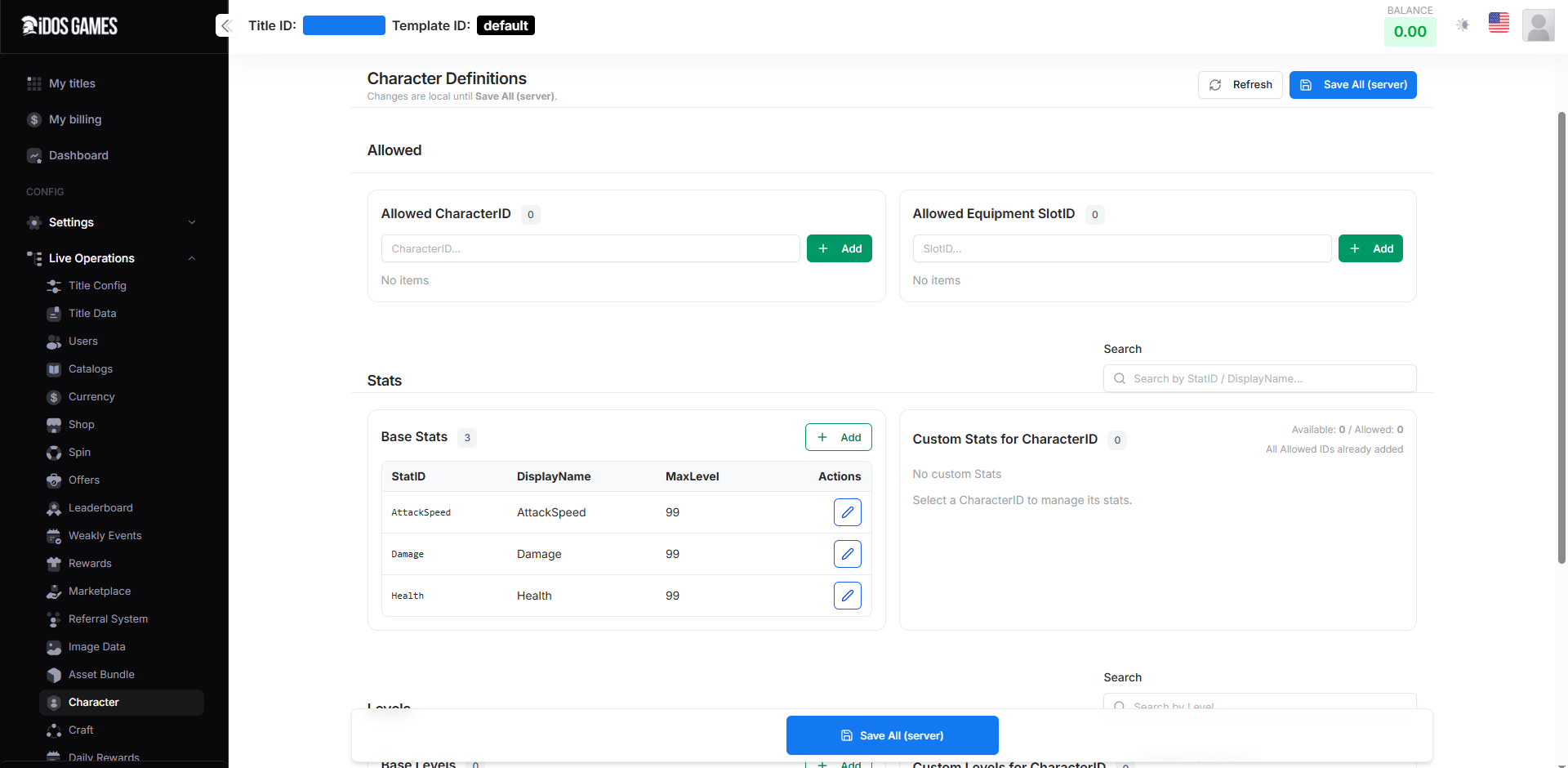
**Allowed CharacterID**
This is the list of identifiers for additional characters that players can unlock. The main character "Main" is always permitted and does not need to be added to this list.
> 💡 If your game only has one character (Main), leave this list empty.
**How to add:** in the admin panel, enter a unique CharacterID (e.g., `warrior`, `mage`, `archer`) into the input field and click **+ Add**.
**Allowed Equipment SlotID**
The list of allowed slots for equipping items. Each SlotID defines a location where an item can be equipped (Helmet, Armor, Weapon, Ring, etc.).
> ⚠️ The EquipItems operation verifies that the specified slot is in this list. If the slot has not been added, equipping into it will be rejected.
***
#### 2.2. Stats Section — Character Attributes
**Base Stats (Global Stats)**
Base stats apply to all characters. Each stat (`StatDefinition`) has the following fields:
| Field | Type | Description |
| ------------------- | ---------------------- | -------------------------------------------------------------------------------------------- |
| `StatID` | string | Unique stat identifier (e.g., Health, Damage, AttackSpeed) |
| `DisplayName` | string | Display name for the UI |
| `MaxLevel` | int | Base maximum upgrade level for the stat. Can be increased by the character level multiplier. |
| `Weight` | int | Stat weight for calculating character Power |
| `BaseCostResource` | ItemOrCurrency | Resource used to pay for upgrades (VirtualCurrency or Item) |
| `BaseCost` | long | Base cost for the first level upgrade |
| `CostScalingFactor` | double | Cost growth coefficient |
| `BaseStatValue` | double | Base stat value at level 1 |
| `StatScalingFactor` | double | Stat value growth coefficient per level |
| `Requirements` | List\ | Prerequisites: other stats that must reach a certain level before upgrading |
| `Description` | string | Description for the UI |
| `IconPath` | string | Path to the stat icon |
**Upgrade Cost Formula**
```
Cost(N) = Round( BaseCost × (1 + CostScalingFactor × (N - 1)) )
```
**Example:** if `BaseCost = 100`, `CostScalingFactor = 0.5`, then:
* Upgrade to level 1 costs **100**
* Upgrade to level 2 costs **150**
* Upgrade to level 10 costs **550**
**Custom Stats for CharacterID**
Custom stats allow you to override stat parameters for a specific character. The lookup logic is:
1. First, search for the stat in `CustomStatDefinitions` for the given CharacterID
2. If not found — use the global `StatDefinitions`
3. If not found anywhere — error
> 💡 This is useful when one character should have a different upgrade cost or a different MaxLevel. For example, "warrior" might have MaxLevel for Health = 150, while Main = 99.
***
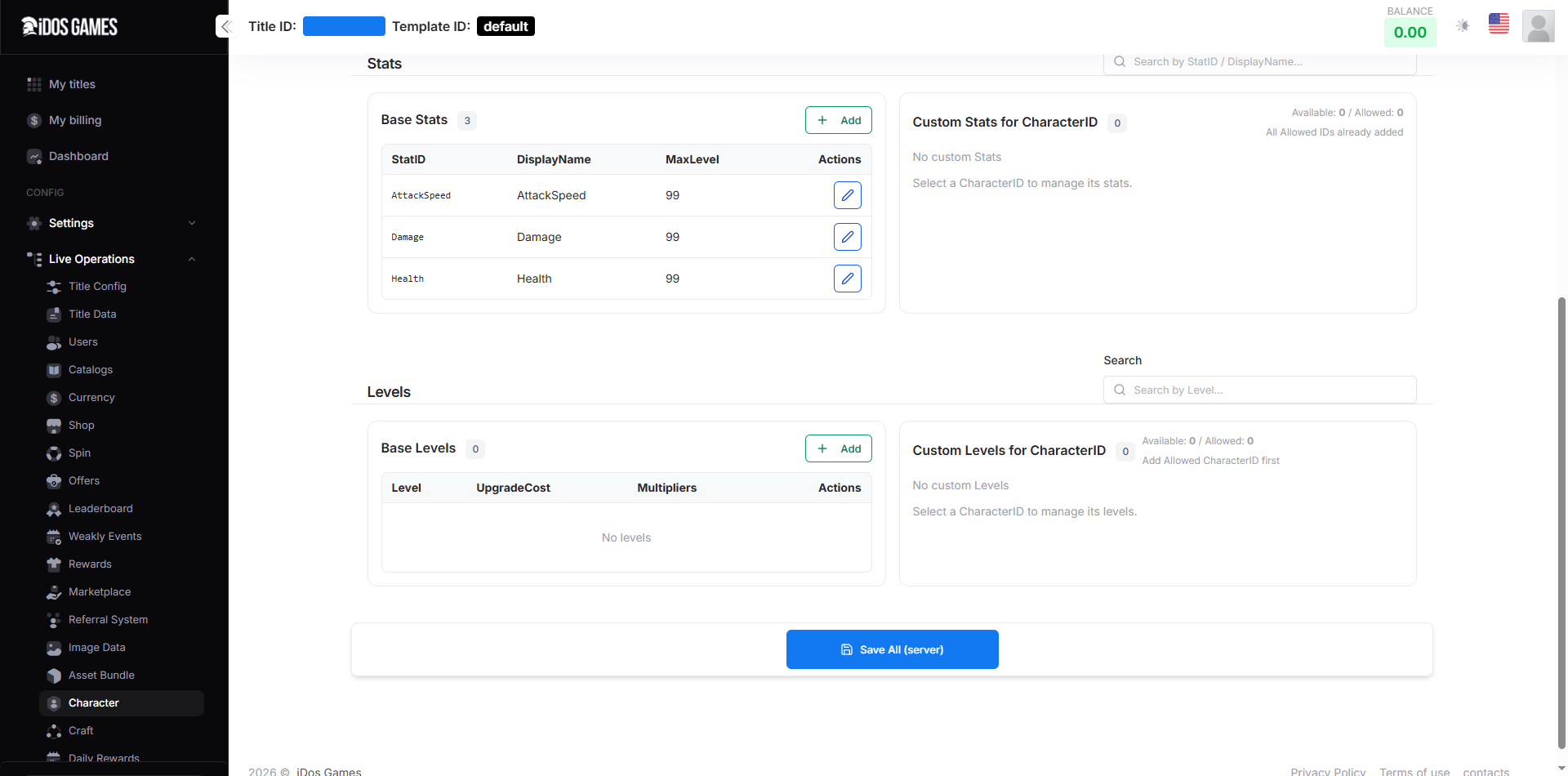
#### 2.3. Levels Section — Character Levels (Stars)
Each character has a Level that can be increased. Levels determine the maximum stat upgrade limit and strengthen the character through multipliers.
**Base Levels**
Global level settings applied to all characters. Each level (`CharacterLevelDefinition`) contains:
| Field | Type | Description |
| ------------------------ | --------------------- | ---------------------------------------------------------------------------------- |
| `Level` | int | Level number (1, 2, 3... = "Star") |
| `UpgradeCost` | List\ | List of resources required to reach this level (currency, items, shards) |
| `GlobalStatMultiplier` | double | Global stat power multiplier (default 1.0) |
| `StatMaxLevelMultiplier` | float | MaxLevel multiplier for stats. For example, 1.5 will increase MaxLevel=100 to 150. |
**Effective MaxLevel Formula**
```
EffectiveMaxLevel = (int)( StatDef.MaxLevel × LevelDef.StatMaxLevelMultiplier )
```
This means that as the character's level increases, new stat levels become available.
**Custom Levels for CharacterID**
Similar to Custom Stats, you can set unique level configurations for a specific character: different upgrade costs and different power multipliers.
The lookup logic is the same: Custom first, then Global.
**Level Configuration Example**
| Level | Cost | GlobalStatMultiplier | StatMaxLevelMult |
| ----- | --------------------- | -------------------- | ---------------- |
| 1 | 100 Gold | 1.0 | 1.0 |
| 2 | 500 Gold + 10 Shards | 1.2 | 1.5 |
| 3 | 2000 Gold + 50 Shards | 1.5 | 2.0 |
***
### 3. API Logic
#### 3.1. Main Character
The "Main" character is available to every player automatically. It does not need to be unlocked and always has a level of at least 1. If no database record exists yet, the system will create one automatically on the first stat upgrade.
#### 3.2. Unlocking Characters
Additional characters start at level 0 (locked / "greyed out"). To activate a character, the player must call `UpgradeCharacterLevel` (transitioning from level 0 to 1), paying the cost defined in the configuration.
> ⚠️ While a character is at level 0, stat upgrades and equipment are unavailable.
#### 3.3. Stat Upgrade (UpgradeStatLevel)
The stat upgrade process for one level includes:
1. Verify that the character is allowed (`IsAllowedCharacter`)
2. Verify that the character is activated (Level ≥ 1) — except for Main
3. Verify prerequisites (`Requirements`)
4. Consume the resource and increase the level
#### 3.4. Character Level Upgrade (UpgradeCharacterLevel)
The character level (star) upgrade process:
1. Determine the current level (0 if the character has not been created yet)
2. Look up the next level config (Custom → Global)
3. Consume the resource and increase the level
> ⚠️ **Important:** when transitioning from level 0 to 1, the full character structure is created (StatLevels, Equipment, Experience).
#### 3.5. Equipment (EquipItems / UnequipItems)
The equipment system links items from the player's inventory to character slots.
**EquipItems:**
* Verifies the slot is allowed (`AllowedEquipmentSlotIDs`)
* Verifies the item exists in inventory and is not equipped elsewhere
* If the slot already has an item — automatically unequips the old one
**UnequipItems:**
* Accepts a list of slots to clear
* Removes the entry from the character's slot
* Resets `IsEquipped` on the item in inventory
**UnequipAllCharacters:**
* Removes all equipment from all characters in a single operation
* Useful for resets or reconfiguration
***
### 4. Step-by-Step Configuration Guide
#### Step 1: Add Characters
If your game supports multiple characters, add their IDs in the **Allowed CharacterID** section. For example: `warrior`, `mage`, `archer`. The Main character does not need to be added.
#### Step 2: Configure Equipment Slots
Add the required slots in the **Allowed Equipment SlotID** section. Example slots: `Helmet`, `Armor`, `Weapon`, `Shield`, `Boots`, `Ring`, `Amulet`.
#### Step 3: Create Base Stats
In the **Base Stats** section, click **+ Add** and fill in the parameters for each stat. Required fields: `StatID`, `MaxLevel`, `BaseCost`, `CostScalingFactor`, `BaseCostResource`.
> 💡 We recommend starting with 2–4 base stats (Health, Damage, Defense, Speed) and adding more as the game evolves.
#### Step 4: Configure Levels (Stars)
In the **Base Levels** section, add level configurations from 1 to the maximum. For each level, specify the cost (`UpgradeCost`) and multipliers.
#### Step 5: Customization (Optional)
If you need unique settings for a specific character:
* Select a CharacterID from the allowed list
* Add custom stats with different parameters (**Custom Stats for CharacterID**)
* Add custom levels if a different upgrade cost is needed (**Custom Levels for CharacterID**)
#### Step 6: Save
After completing all settings, click the **Save All (server)** button. Changes are stored locally until saved to the server. The **Refresh** button allows you to discard local changes and reload the current data from the server.
***
### 5. Player Data Structure
Character data is stored in the `Characters` field of the `UserData`. It is a dictionary where the key is the CharacterID and the value is a `CharacterModel`.
#### CharacterModel
| Field | Type | Description |
| ------------- | --------------------------- | ------------------------------------------------------ |
| `CharacterID` | string | Character identifier ("Main" or GUID) |
| `Level` | int | Current level (star). 0 = locked, 1+ = active |
| `Experience` | long | Character experience (reserved for future expansion) |
| `Power` | int | Character power (calculated based on stats and Weight) |
| `StatLevels` | Dict\ | Current stat levels. Key = StatID, value = level |
| `Equipment` | Dict\ | Equipped items. Key = SlotID, value = EquippedItem |
#### EquippedItem
| Field | Type | Description |
| ---------------- | -------- | ------------------------------------------------------------ |
| `ItemID` | string | Item identifier from the catalog |
| `ItemInstanceID` | string | Reference to the specific instance in the player's inventory |
| `CatalogVersion` | string | Catalog version or name of the item |
| `EquippedAt` | DateTime | Date/time when the item was equipped |
***
### 6. API Actions
| Action | Description |
| ------------------------- | ------------------------------------------------------------------------------------ |
| `GetCharacterDefinitions` | Returns the full character configuration (stats, levels, slots) |
| `GetUserCharacters` | Returns the current player's character dictionary |
| `UpgradeStatLevel` | Upgrades the specified stat by 1 level. Requires `CharacterID` and `StatID` |
| `UpgradeCharacterLevel` | Increases the character's level (star) by 1. Requires `CharacterID` |
| `EquipItems` | Equips items into character slots. Requires `CharacterID` and `ItemsToEquip` |
| `UnequipItems` | Unequips items from the specified slots. Requires `CharacterID` and `UnequipSlotIDs` |
| `UnequipAllCharacters` | Removes all equipment from all of the player's characters |
***
### 7. Usage Examples
#### Example 1: Simple Game with One Character
* **Allowed CharacterID:** empty (Main only)
* **Allowed Equipment SlotID:** Weapon, Armor, Helmet
* **Base Stats:** Health (MaxLevel=50), Damage (MaxLevel=50), Defense (MaxLevel=50)
* **Base Levels:** not needed (single character, stat upgrades only)
#### Example 2: RPG with Multiple Characters
* **Allowed CharacterID:** warrior, mage, archer
* **Allowed Equipment SlotID:** Helmet, Armor, Weapon, Shield, Ring, Amulet
* **Base Stats:** Health, Damage, AttackSpeed, Defense (MaxLevel=99)
* **Custom Stats:** mage — MagicPower (MaxLevel=120), warrior — BlockChance
* **Base Levels:** 1–5 with increasing cost and StatMaxLevelMultiplier
* **Custom Levels:** mage has cheaper upgrades, warrior has more expensive upgrades but a stronger multiplier
***
### 8. FAQ
**Q: Can I delete a stat after players have already upgraded it?** A: Technically yes, but player data will remain in the database. It is recommended not to delete it, but to set `MaxLevel = 0` to freeze further upgrades.
**Q: How does the Custom over Global priority work?** A: The system first looks for the setting in Custom (for the specific CharacterID). If not found, it falls back to Global. This applies to both Stats and Levels.
**Q: Can one item be equipped on multiple characters?** A: No. An item can only be equipped on one character at a time (`IsEquipped` flag in inventory). To transfer it, you must unequip it first.